
If you’re someone who loves minimal and classy UI designs, then the JIHE HyperOS Theme is definitely worth checking out. In a world full of flashy and overloaded themes, JIHE stands out by keeping things simple, clean, and visually pleasing.
This is a free mtz theme for HyperOS users who want a premium feel without compromising performance or readability. Whether you’re using a Xiaomi, Redmi, or Poco device running HyperOS (especially on custom ROMs like Xiaomi EU), this theme fits perfectly.
Why JIHE Theme Stands Out
The JIHE theme is designed for users who prefer simplicity. It doesn’t try to overdo things—instead, it focuses on balance and usability. Without animations or additional features, you get a polished and modern UI design. The minimal design of this theme doesn’t affect your device’s performance and helps deliver maximum battery life your phone can have.
Additionally, you can use external widgets (like minimal widgets) to setup making it ever more useful and extremely cool looking theme ever.
Key Features of JIHE HyperOS Theme
Beautiful Icon Pack
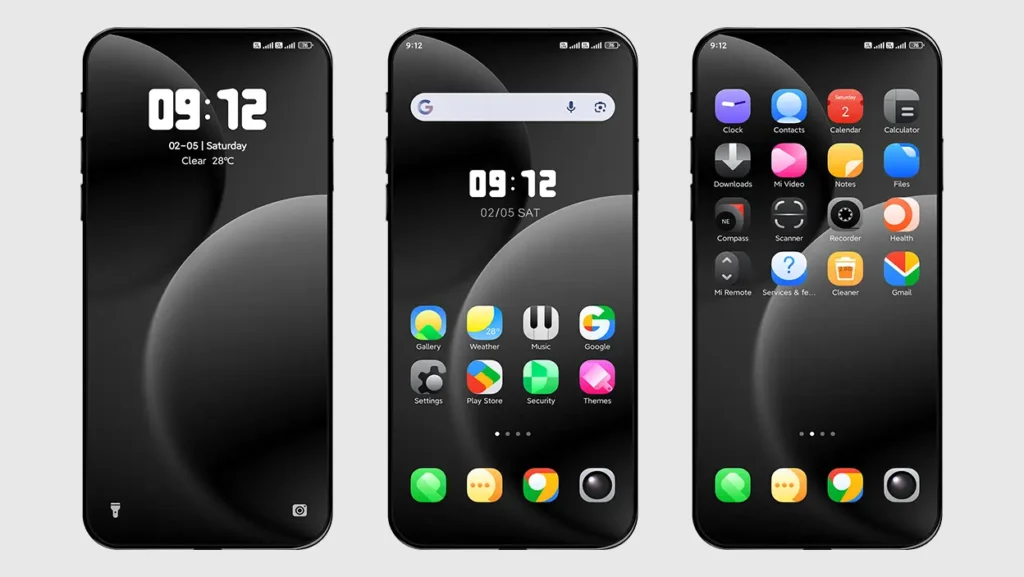
The theme comes with a set of clean and well-designed icons. They are minimal yet stylish, perfectly matching the overall aesthetic of the theme.
Dark Minimal Wallpapers
If you’re into dark mode, you’ll love the wallpapers included in this theme. They are subtle, minimal, and easy on the eyes—perfect for both day and night usage.
Simple and Clean Lock screen
The lock screen is one of the highlights of the JIHE theme. It’s not overloaded with unnecessary elements. Instead, it offers a neat and distraction-free look while still being functional.
Clutter-free UI Experience
Thanks to its lightweight design, the theme runs smoothly without affecting performance. Everything feels responsive and fluid.
Who Should Use This Theme?
If you’re tired of heavy themes with too many effects and just want something clean, elegant, and usable, JIHE is made for you.
- Users who prefer minimal design
- Premium design without compromising performance
- People using custom ROMs like Xiaomi EU
- Anyone looking to download best Xiaomi theme without clutter
Theme Screenshots
Theme Information
| Name: | JIHE |
| Designer: | 0001D |
| Compatibility: | HyperOS | MIUI |
| Size: | 18.0 MB |
| Type: | MTZ File |
Download Sections
How to Install This Theme
Follow these simple steps to install an .mtz theme file on any Xiaomi, Redmi or Poco Device:
- Open the Themes app on your device.
- Go to My Account.
- Select the Themes option.
- You’ll see a list of your pre-installed themes. Scroll down and tap on the Import option.
- Locate and select the JIHE [ENG].mtz file you downloaded.
- The theme will be added to your themes list.
- Finally, tap on the theme and press Apply to set it on your device.
Final Thoughts
The JIHE HyperOS Theme proves that simplicity can be powerful. With its clean design, elegant icons, and minimal lock screen, it delivers a premium experience without unnecessary distractions. It’s easily one of the best choices if you want to download best Xiaomi theme with a modern and minimal touch.