

Get ready for the latest iPhone Duo experience on any Xiaomi, Redmi, or POCO smartphone with the Super Mi Duo HyperOS Theme. The theme is inspired by the latest iOS 27 style and UI design, combined with an iPhone Duo-inspired layout and wallpapers.
The theme brings a sleek and modern iOS-style design to your device, featuring beautifully crafted iOS 27 inspired icons, iPhone Duo wallpapers, and a fully customizable lock screen. It is designed for users who enjoy the simplicity and elegance of Apple’s visual style while staying on HyperOS.
Super Mi Duo HyperOS Theme is a slightly tweaked version of the iP27 Super Capsule theme, featuring minor layout changes along with several new and updated features. The theme aims to deliver a complete iPhone Duo-like user experience with a cohesive combination of iOS-inspired features, aesthetics, and interface elements.
Key Features of Super Mi Duo HyperOS Theme
Let’s explore the key features of the Super Mi Duo HyperOS Theme that make it a great choice for an iPhone Duo-like makeover on your Xiaomi, Redmi, or POCO smartphone.
iPhone Duo Lock Screen
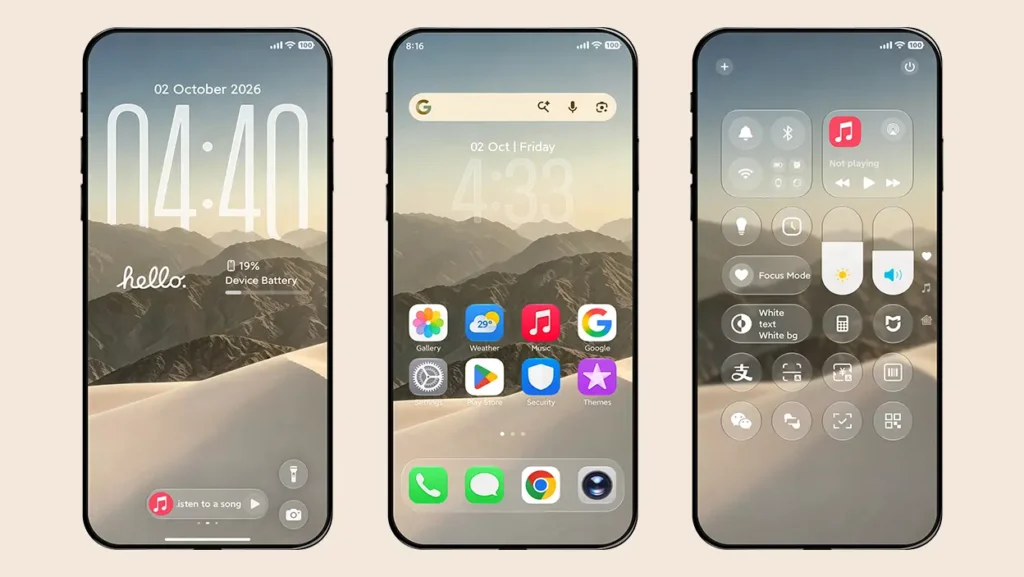
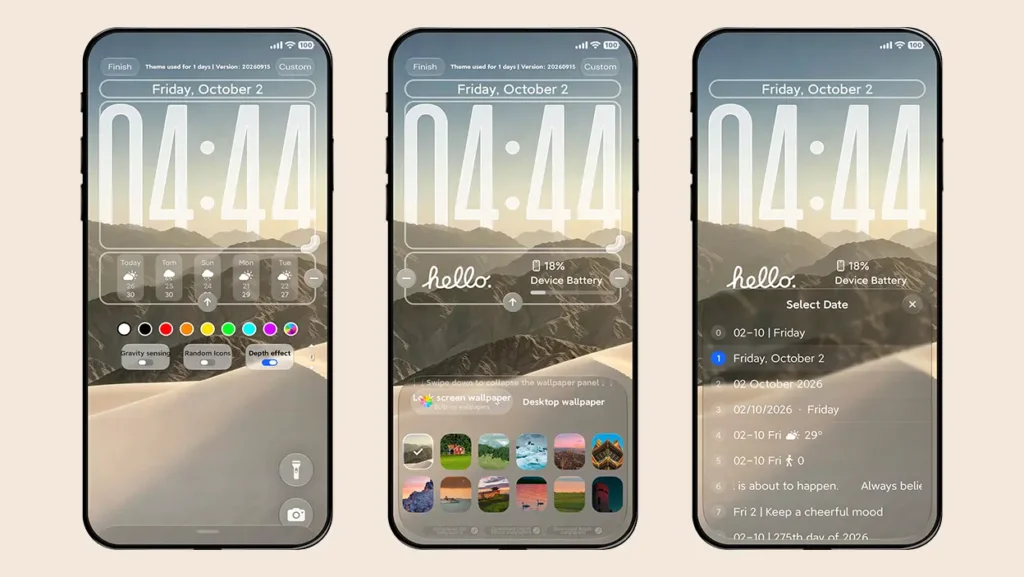
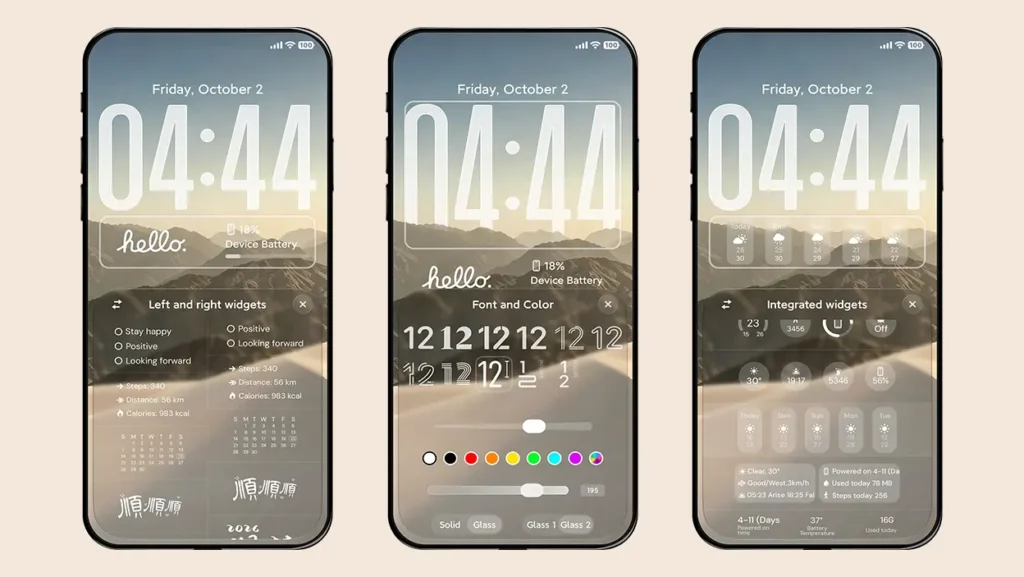
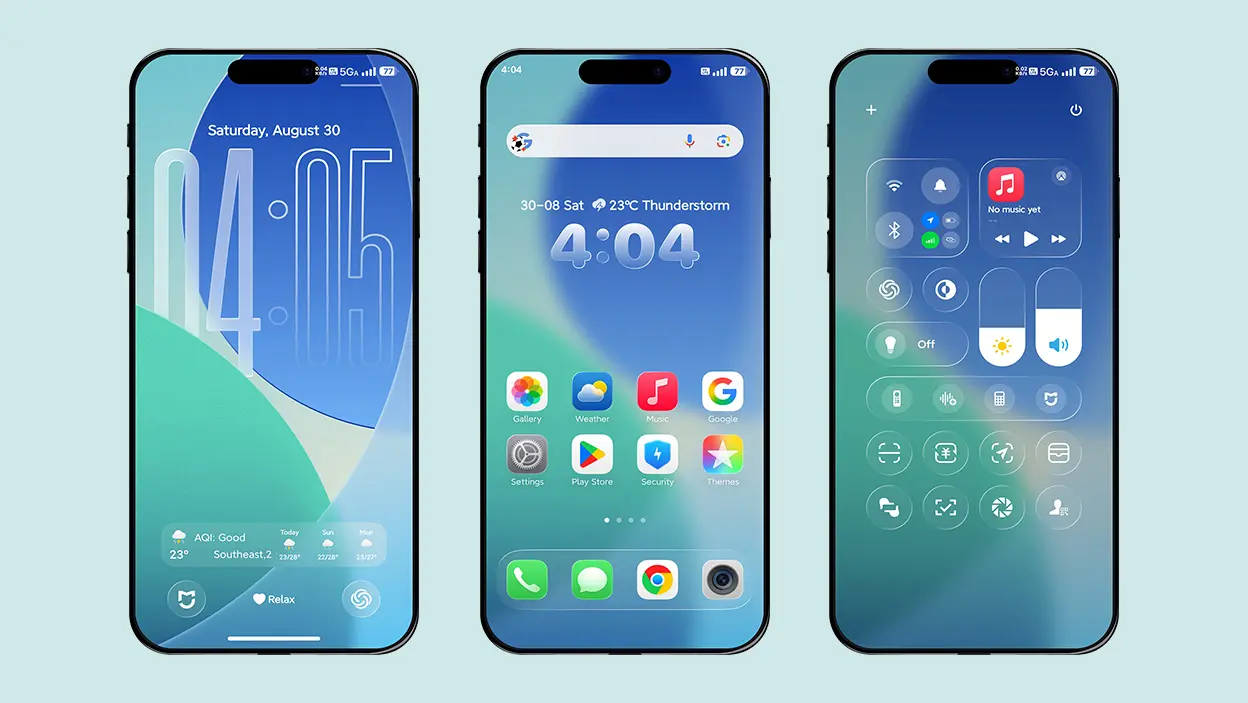
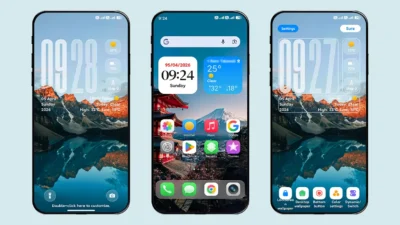
The theme features an iPhone Duo-inspired lock screen layout, with both bottom shortcuts positioned on the right side and the new default Duo wallpaper. Along with the redesigned layout, you get a wide range of iOS-style customization options, including different time and date styles, widgets, charging animations, depth effect wallpapers, and much more.
iOS 27-Inspired Icons
The icons are heavily inspired by the latest iOS 27 design, matching the visual style of the iPhone Duo. Currently, the icon pack is limited to system apps and does not provide support for third-party applications.
However, the theme’s icon shape and icon border features help maintain a symmetrical appearance across all icons. The glass-style border also gives unsupported app icons a more consistent look with the rest of the interface.
iOS-Inspired Control Center
The theme includes an exclusive iOS-inspired Control Center that closely resembles the design of the iPhone’s Control Center. It includes various shortcuts and toggles, music player controls, and a volume level indicator.
One thing to note is that this customized Control Center can only be accessed from the lock screen. You must also enable it through the theme’s lock screen settings before using it.
Super Capsule
Super Capsule is one of the most trendy features found in some of the latest HyperOS themes, and this theme takes the feature a step further with a glass-style capsule positioned at the bottom of the lock screen.
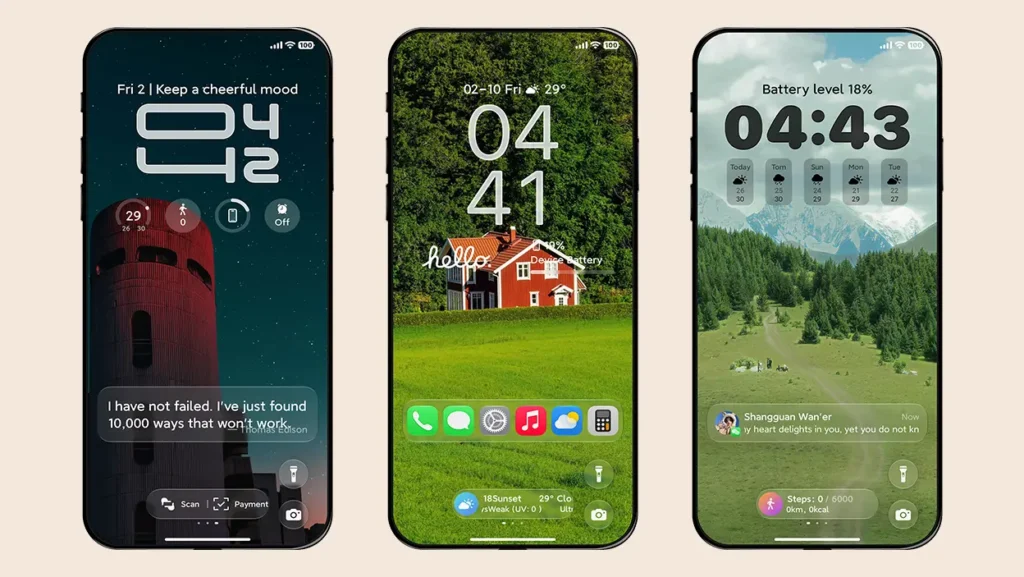
The capsule can display useful information such as battery level, weather, step count, payment shortcuts, and music controls. You can swipe left or right on the capsule to switch between different information cards.
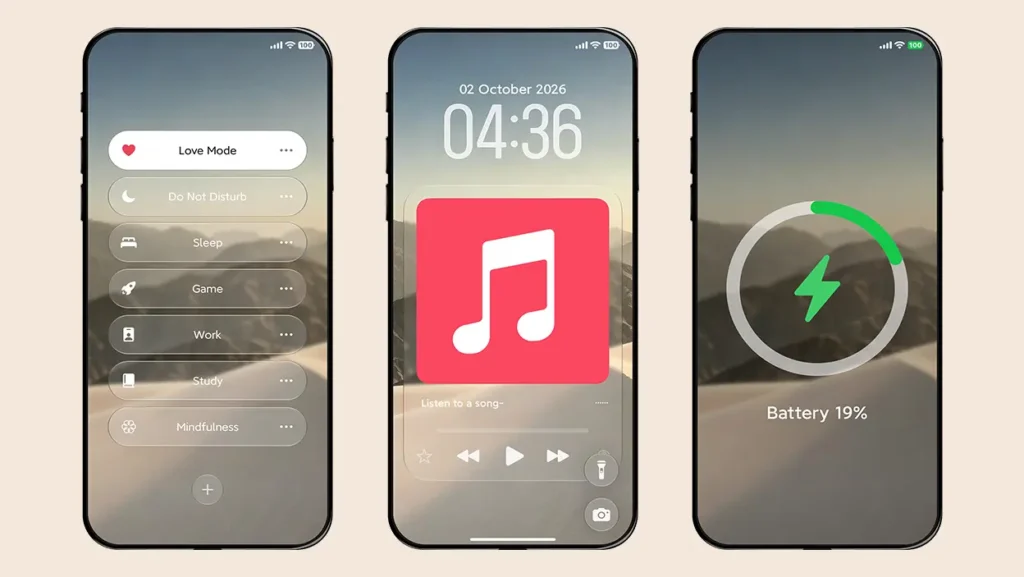
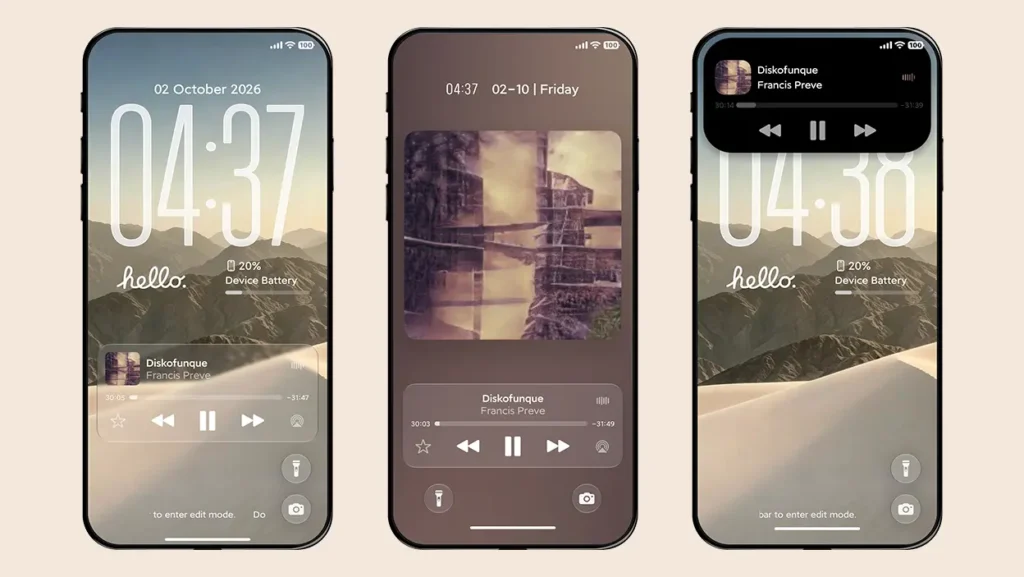
When music is playing, tapping the music player capsule expands it to display additional controls and album artwork.
Dynamic Island
The iPhone-style Dynamic Island adds several interactive visual effects to the theme. It can display charging status, incoming notifications, flashlight animations when the torch is turned on, and currently playing music with playback controls.
The theme also gives you several camera-area styles to choose from, including the traditional Notch, Large Forehead, 3-Hole, and 5-Hole styles. The Large Forehead option turns the entire camera area black for a more distinctive appearance.
StandBy Mode
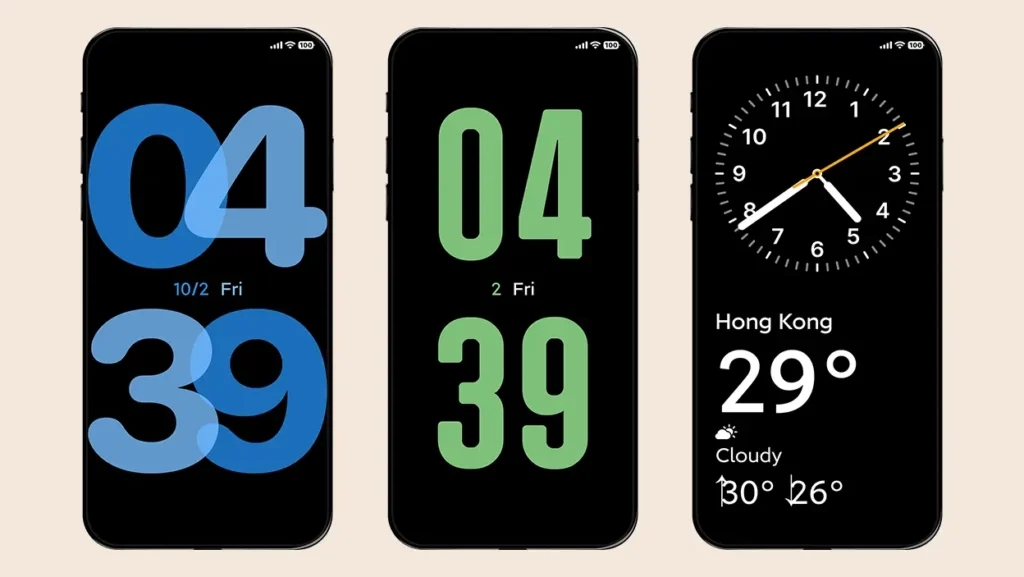
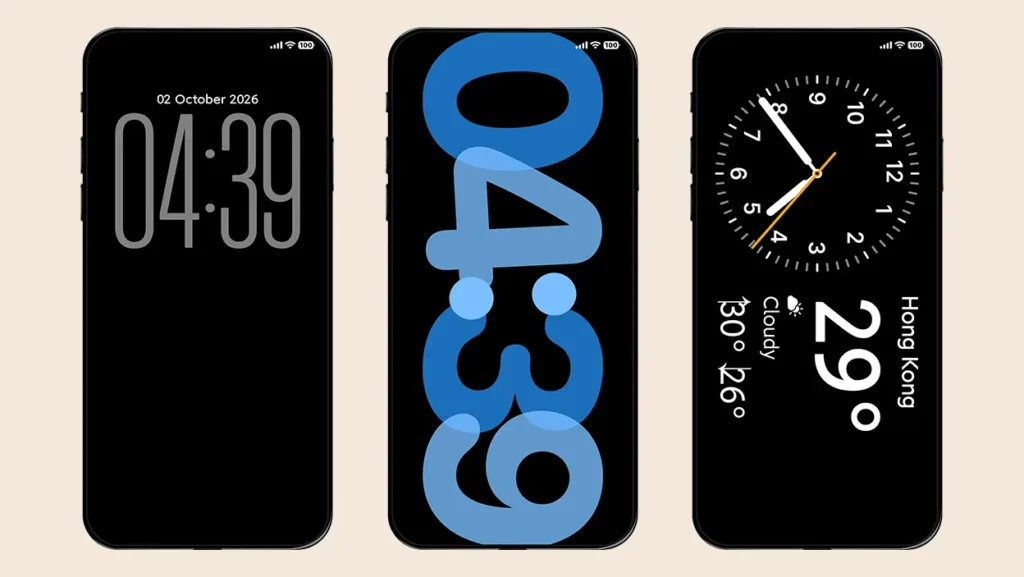
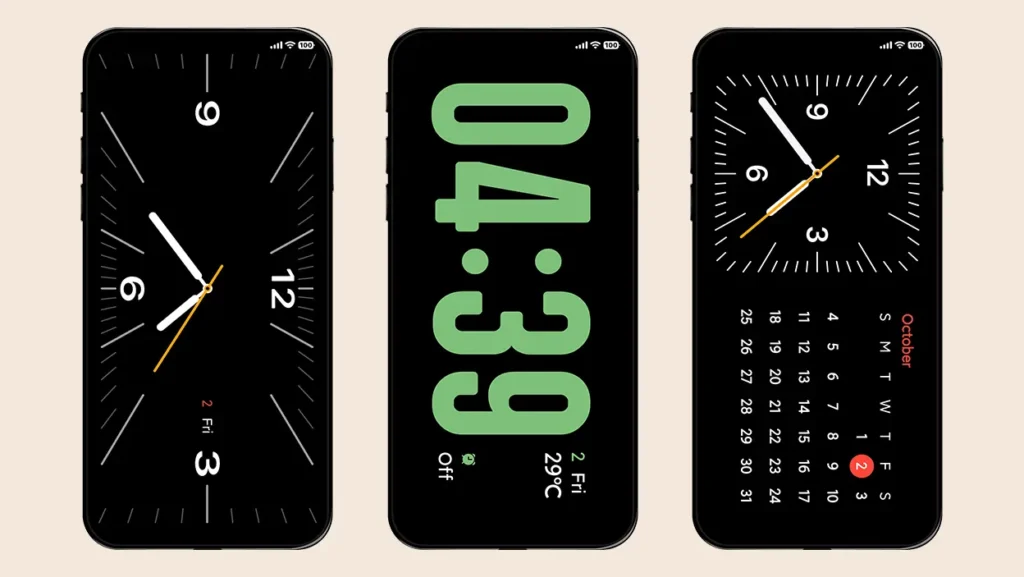
The theme includes five different StandBy Mode styles, with support for both horizontal and vertical orientations.
You can customize several aspects of StandBy Mode, including notification alerts, battery-level progress bars, and the background. The background can be set to either a solid color or a Gaussian blur effect.
There is also an option to automatically enter StandBy Mode when the device is connected to a charger.
Always-On Display Mode
You can double-tap an empty area on the lock screen to enter the Always-On Display (AOD) mode. The feature offers an iPhone-inspired way to customize how your wallpaper appears while the device is in AOD mode.
You can either dim the existing wallpaper or use the default solid black background. The theme also provides several transition animations when AOD mode is activated.
The AOD duration can be set to 10 seconds or remain active permanently until you press the power button.
Focus Mode
Focus Mode is a simulated feature included primarily for visual purposes and does not provide actual device functionality. It adds another layer to the iPhone-inspired experience by allowing you to switch between different Focus Mode appearances directly from the theme.
Depth Effect Wallpapers
The theme includes 12 different depth effect wallpapers, with the default wallpaper extracted from the iPhone Duo. All included wallpapers are available in high quality and high resolution.
You can also add your own regular or depth effect wallpapers through the theme’s lock screen settings. For users who prefer multiple wallpapers, there is a folder wallpaper option that lets you cycle through wallpapers.
The theme can also synchronize your lock screen wallpaper with your desktop wallpaper, eliminating the hassle of applying wallpapers separately to the lock screen and home screen.
Versatile Fingerprint
The Versatile Fingerprint feature allows you to customize the fingerprint scanner icon with nine unique styles.
You can adjust the fingerprint icon’s opacity and background, hide the fingerprint animation, or completely disable the fingerprint animation according to your preference.
Note: This feature is only supported on devices equipped with an in-display fingerprint scanner.
Charging Animation
The theme includes two iOS-inspired charging animations. The first is a full-screen MagSafe-style animation, while the second uses a bottom pop-up design.
If you prefer the standard HyperOS experience, you can switch back to the default HyperOS charging animation or disable the charging animation completely.
Customizable Time, Date & Widgets
The lock screen clock offers extensive customization options. You can adjust its height, transparency, glass effect, and color to match the wallpaper and overall lock screen design.
The theme includes 11 different clock font styles, with both horizontal and vertical layouts available.
The date section provides 14 different date formats. Depending on the selected layout, you can display the date and weekday along with information such as weather, step count, custom text, battery level and range, location, and more.
The widget system is divided into two main sections: Left & Right Widgets and Integrated Widgets.
The Left & Right Widget system allows you to select separate widgets for the left and right sides of the lock screen. The Integrated Widget system, on the other hand, lets you select a single layout containing multiple widgets.
Both options provide several ways to display useful information directly on the lock screen, giving you quick access to important details without unlocking your device.
Bottom Cards
Bottom Cards are another iOS-inspired feature that lets you customize the information displayed at the bottom of the lock screen.
You can choose between Quick Apps, Quotations, Payment Shortcuts, and simulated notifications. Each option comes with its own customization settings, allowing you to personalize the appearance and information displayed on the lock screen.
Super Splash Screen
The super splash screen effect allows you to display various effect when the lock screen is turned on. Remove you boring HyperOS default effect and choose from seven unique animations.
- Full-screen gradual brightening
- Gradual brightening from the center
- Gradual lighting from the power button
- Circle expansion from the center
- Circle expansion from the power button
- Door opening effect — Pull
- Door opening effect — Push
These are the best features of Super Mi Duo HyperOS Theme. Further customization features and parameter adjustments in this theme can only be accessed through the theme’s lock screen settings. To access them, open Themes → My Account → Lock Style → Customize (Gear Icon).
Theme Screenshots, Download Links & Installation Guide
Here are the complete screenshots, theme details, download link, and installation guide for the Super Mi Duo HyperOS Theme. Follow the steps carefully to apply this MTZ theme successfully on your Xiaomi, Redmi, or Poco device.
Theme Screenshots
Before downloading the theme, let’s take a look at how the above-mentioned features look in action on your device.
Theme Information
| Name: | Super Mi Duo / 超级米Duo |
| Designer: | 苏哥suger |
| Compatibility: | HyperOS 1.0 | 2.0 | 3.0 |
| Size: | 40.2 MB |
| Type: | MTZ File |
Download Links
How to Install Super Mi Duo Theme
Applying this MTZ theme is quick and easy. Simply follow the steps below to import the downloaded MTZ file through the Themes app and apply it successfully to your device.
- Open the Themes app on your device.
- Go to My Account.
- Tap on the Themes option.
- You’ll see a list of your pre-installed themes. Scroll down and tap on the Import option.
- Locate and select the Super Mi Duo [ENG].mtz file you downloaded.
- The theme will be added to your themes list.
- Finally, tap on the theme and press Apply to set it on your device.
Final Verdict
Final Verdict
If you are looking for an iPhone Duo-inspired HyperOS theme with an iOS 27-style interface, Super Mi Duo is definitely worth trying. From its Duo-inspired lock screen and iOS-style icons to Dynamic Island, StandBy Mode, Super Capsule, depth effect wallpapers, and extensive customization options, it offers a complete visual makeover for your Xiaomi, Redmi, or POCO smartphone. It is also a great option to consider if you are exploring the best iOS themes for HyperOS.
If you enjoyed the theme, don’t forget to share it with your friends and fellow Xiaomi users. Also, feel free to share your thoughts and experience in the comments section. If you encounter any issues while installing the theme, notice any bugs, or find any translation issues, please let us know in the comments.
That’s awesome! I’ve been waiting for this theme for a long time. Thank you so much, admin. You’re the best! ❤️