
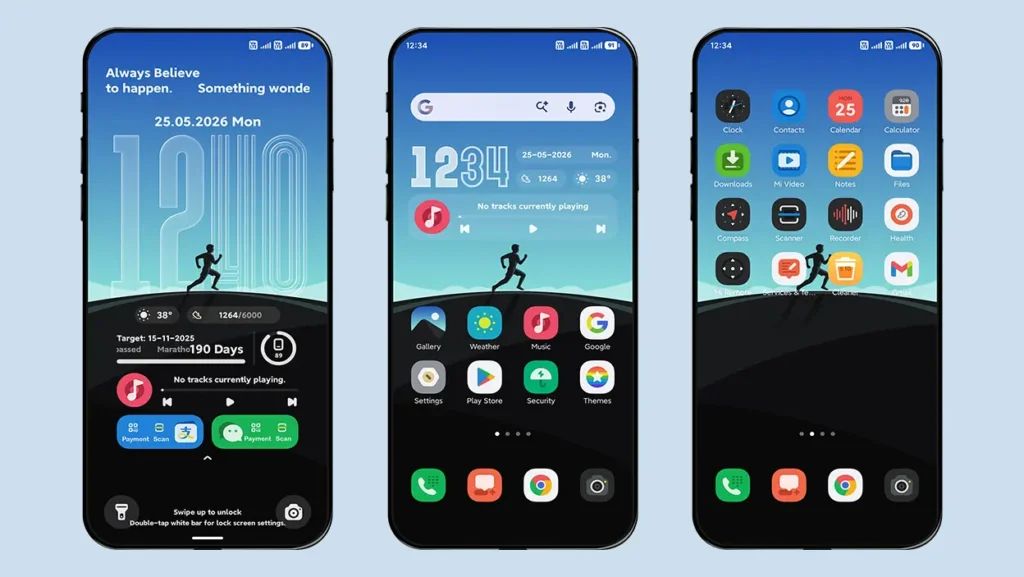
We are back with another premium and stylish theme called “RUN” for all Xiaomi, Redmi, and Poco devices running HyperOS. Like other themes, this theme also features a modern and classy UI design along with its most unique feature, the Dynamic Wallpaper.
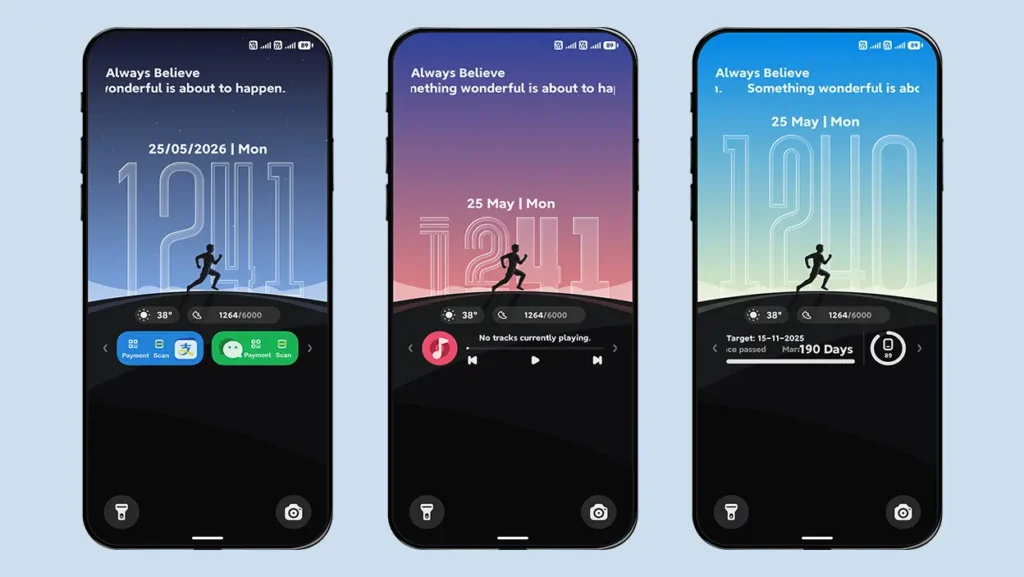
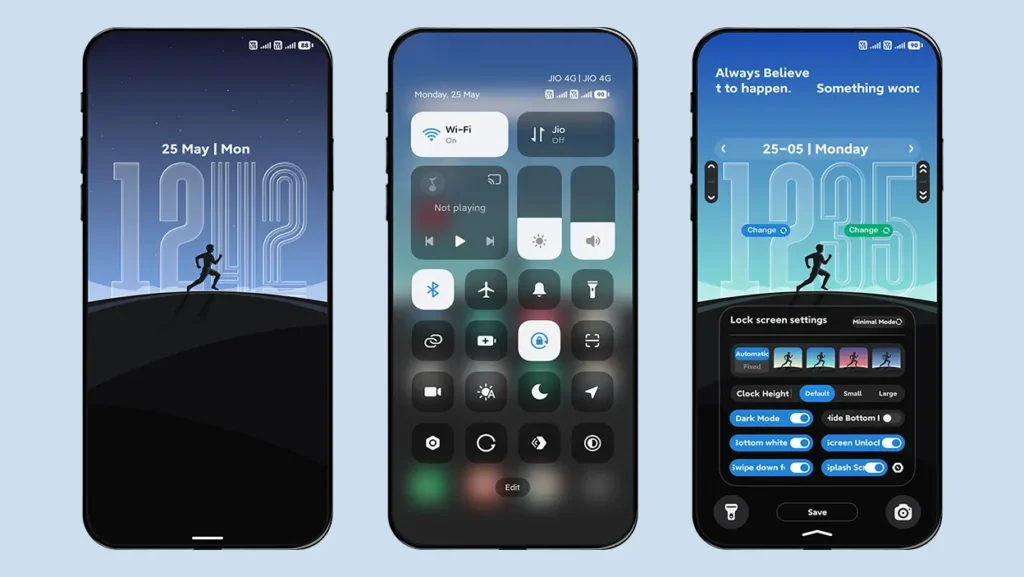
Yes, you heard it right. A completely free HyperOS theme that offers a wallpaper system that automatically changes with time. For example, a light blue wallpaper during the day, a blue wallpaper in the afternoon, a red and purple mixed wallpaper in the evening, and a dark blue wallpaper at night. Both the lock screen and home screen stay in sync, which means whenever the wallpaper changes on the lock screen, it also changes on the home screen.
This wallpaper system is completely time-based and automatic, but you can also use the Fixed Mode feature for a static wallpaper or simply add your own custom wallpaper from the lock screen settings.
Lock Screen Features
Other than the Dynamic Wallpaper feature, this theme includes a lock screen clock with 3 different styles along with multiple font styles that can be individually changed for the hour and minute digits.
You can also adjust the clock vertically to match the depth effect of the wallpaper.
Widget Styles
You can also switch between 3 different styles of widgets:
1. Target Date & Battery Indicator
Displays the target date and battery information in a clean layout.
2. Music Player Widget
A dedicated widget for users who frequently listen to music.
3. Payment Widgets
Quick access payment-style widgets for a modern lock screen experience.
Other Features of RUN Theme
- Minimal Mode – You can make your lock screen cleaner with this mode by hiding extra information from the lock screen.
- Dark Mode – You can enable or disable Dark Mode depending on the wallpaper you are using for better visibility.
- Swipe Down Feature – Swiping down on the lock screen will show all 3 widgets together, but with this option, you can disable it anytime.
- Splash Screen Animation – Every time you visit the lock screen, you will notice a cool lock screen animation. You can also enable or disable this feature.
- Customizable Date Style – You can switch between 5 different date styles anytime.
- Home Screen Widget – This widget provides: Time, Date, Week, Steps count, Temperature information, and Music player controls.
- Icons – The theme comes with uniquely designed icons for a fresh and completely new look.
- Other UI Changes – You will also notice minor UI changes in Control Center, Dialer, Contacts, Messaging App, and Other system applications.
Theme Screenshots
Theme Information
| Name: | RUN |
| Designer: | xlee |
| Compatibility: | HyperOS | MIUI |
| Size: | 24.4 MB |
| Type: | MTZ File |
Download Section
MTZ File Installation Guide
Follow these simple steps to install an .mtz theme file on any Xiaomi, Redmi or Poco Device:
- Open the Themes app on your device.
- Go to My Account.
- Select the Themes option.
- You’ll see a list of your pre-installed themes. Scroll down and tap on the Import option.
- Locate and select the RUN [ENG].mtz file you downloaded.
- The theme will be added to your themes list.
- Finally, tap on the theme and press Apply to set it on your device.
Why You Should Try RUN Theme
If you love customizing your Xiaomi, Redmi, or Poco device, then the RUN Theme is definitely worth trying. The combination of dynamic wallpapers, customizable lock screen styles, modern widgets, and premium UI design makes it one of the most stylish MTZ Themes available for HyperOS users.
Whether you are using official HyperOS or a Custom ROM, this theme delivers a clean, modern, and unique experience. If you enjoyed the theme, please share it with your friends. If you find any bugs, feel free to let us know in the comments.