

Want to enjoy clean aesthetics with a modern interface and smooth animations? Well, the Clean UI HyperOS theme brings everything together in one package. If you are bored of trying themes that offer similar features or simply want a clean and minimal look on your Xiaomi, Redmi, or POCO smartphone, then Clean UI should be your go-to choice.
This theme combines minimalism with a premium UI design, creating an interface that looks elegant and modern, making it a great choice for daily use. You get premium-quality icons, cool animations, a unique lock screen interface, and much more, all without compromising performance or causing excessive battery drain.
Key Features of Clean UI HyperOS Theme
Before you download the Clean UI MTZ file, let’s explore the features this Xiaomi theme offers and why it could be a great choice over other HyperOS themes.
Premium Quality Icons
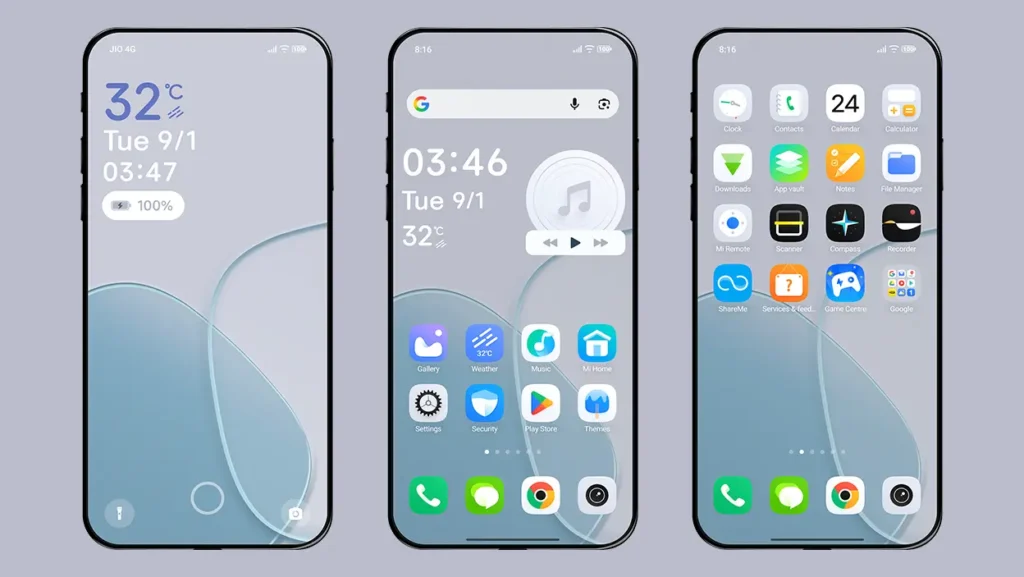
The icons are designed in very high quality and are unique to the theme itself. You will find support for all system applications along with many popular third-party applications. Overall, the icons look consistent, clean, and premium.
Minimal Lock Screen with Multi-Screen Feature
The lock screen interface is kept clutter-free and looks very pleasing with smooth animations. Apart from this, you can swipe left and right to access the lock screen’s multi-screen feature.
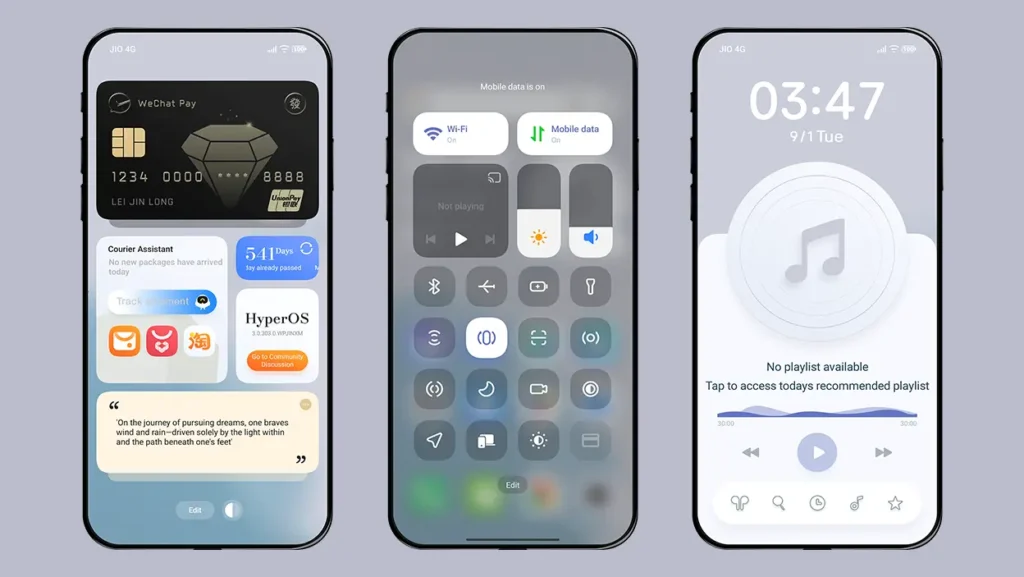
Swiping left allows you to access a card-style lock screen with a Dark Mode icon to switch the lock screen to Dark Mode, including the wallpaper. Swiping right gives you access to a full-screen music player with music controls, making it a great feature for music lovers.
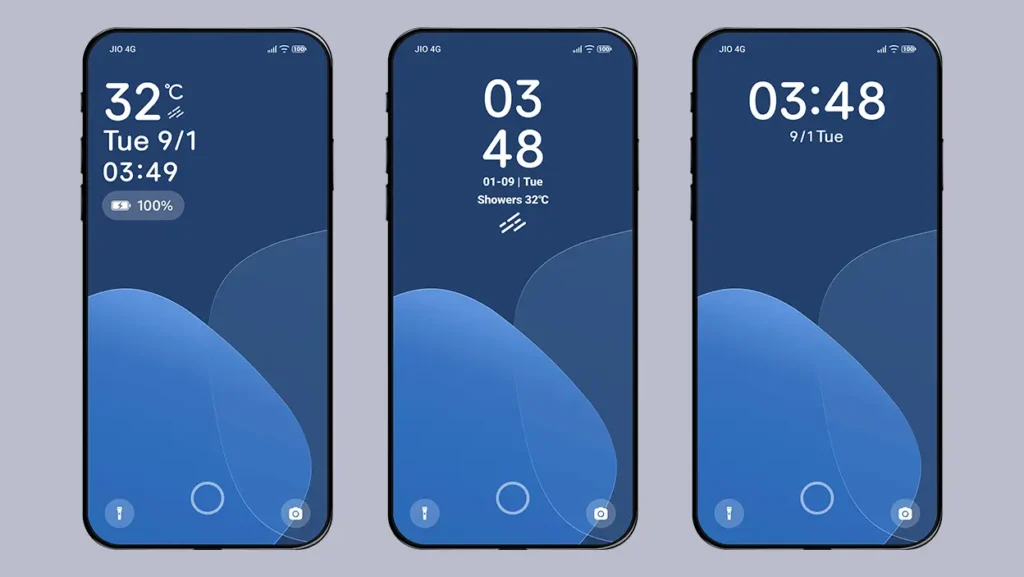
Three Different Clock Styles
Access the theme’s lock screen settings from the Themes app, and you can choose between three different lock screen clock styles. Each clock style is simple and minimal but comes with a different orientation. Our recommendation is to keep the default clock layout, as it displays the temperature, date, time, and battery information while maintaining a minimal look.
Animated Wallpaper
The theme comes with a gradient wallpaper for both the home screen and lock screen. The lock screen wallpaper features a smooth animation that works along with the clock styles, making the overall lock screen interface more engaging. Note that the Dark Mode wallpaper is not animated.
Always-on Display Feature
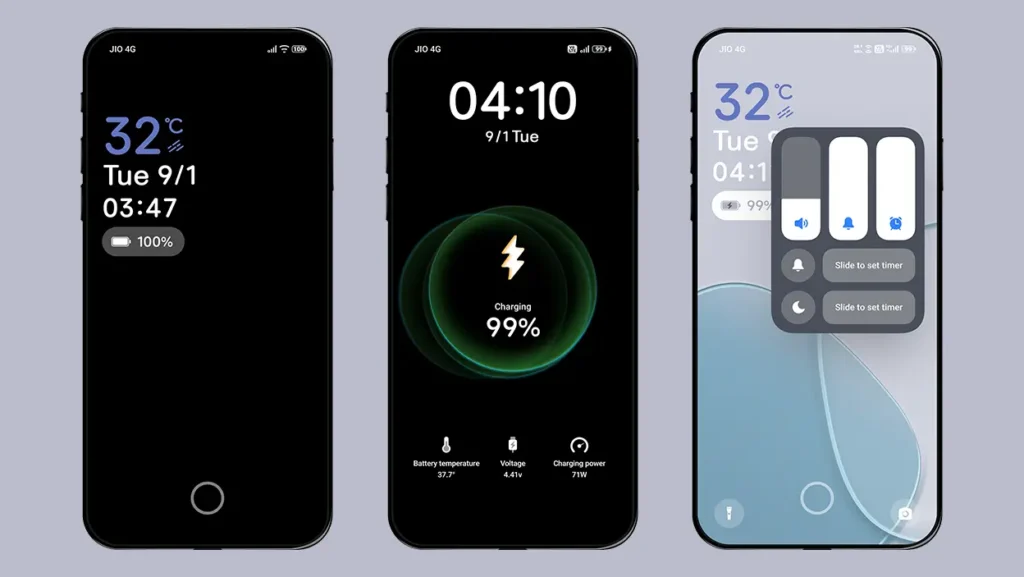
Double-tap on the lock screen to enter Always-on Display mode. It can look particularly great on AMOLED screens, but you can also opt for a 20-second duration if you are concerned about battery life. As soon as you double-tap on the lock screen, a smooth circular animation appears around the touch area, after which the screen goes black and shows only useful information.
Unique Charging Animation
The theme comes with its own built-in charging animation, which gives it a distinctive look. When you connect the charger, the screen goes black and displays a cool circular charging animation with useful battery information such as temperature, voltage, and charging power, along with the time and date.
Animated Home Screen Widget
The home screen widget has a simple design, showing the time, date, and temperature on one side and music controls on the other. It also features a subtle animation each time you return to the home screen. The widget matches the overall home screen setup and complements the theme’s clean aesthetics.
Modern and Clean Interface
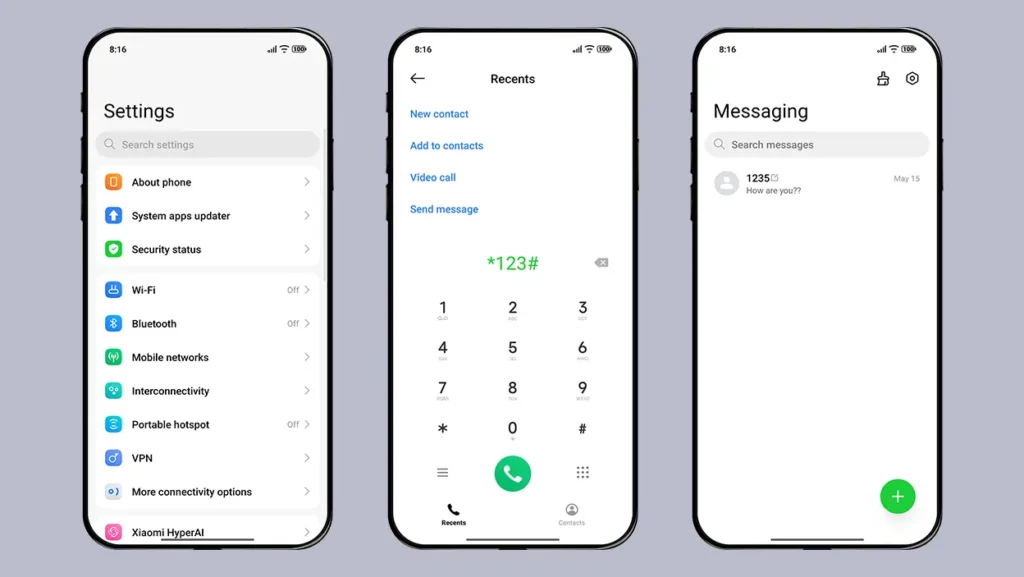
Apart from the features mentioned above, the theme maintains the same consistency across other UI elements, including the Control Center, Status bar icons, Settings app, Dialer, and Messaging apps. The key highlight of the theme is its clean interface, which perfectly matches its modern aesthetics.
Theme Screenshots, Download Links & Installation Guide
Here are the complete screenshots, theme details, download link, and installation guide for the Clean UI HyperOS Theme. Follow the steps carefully to apply this MTZ theme successfully on your Xiaomi, Redmi, or Poco device.
Theme Screenshots
Theme Information
| Name: | Clean UI / 纯净 UI |
| Designer: | 怪脾气 |
| Compatibility: | HyperOS 1.0 | 2.0 | 3.0 |
| Size: | 70.6 MB |
| Type: | MTZ File |
Download Links
Using a Global ROM? Learn how to permanently apply MTZ themes on your Xiaomi, Redmi, or POCO device.
How to Apply MTZ Theme
Applying this MTZ theme is quick and easy. Simply follow the steps below to import the downloaded MTZ file through the Themes app and apply it successfully to your device.
- Open the Themes app on your device.
- Go to My Account.
- Tap on the Themes option.
- You’ll see a list of your pre-installed themes. Scroll down and tap on the Import option.
- Locate and select the Clean UI [ENG].mtz file you downloaded.
- The theme will be added to your themes list.
- Finally, tap on the theme and press Apply to set it on your device.
Final Verdict
Clean UI HyperOS theme is a great choice if you prefer a clean, minimal, and modern look on your Xiaomi, Redmi, or POCO smartphone. With premium icons, smooth animations, a unique lock screen, and a well-designed interface, the theme offers a polished experience without making things feel too complicated. If minimal aesthetics are your thing, Clean UI is definitely worth trying.
If you enjoyed the theme, don’t forget to share it with your friends and fellow Xiaomi users. Also, feel free to share your thoughts and experience in the comments section. If you encounter any issues while installing the theme, notice any bugs, or find any translation issues, please let us know in the comments.
Guofeng 27 + iP27 super capsule
Admin, please don’t forget these two themes. I really want the fully English versions of both of them. Please. 🙏❤️
Those 2 themes will be added for sure. Please be patience. It will take some time to port and upload them on our website.
Okay, I trust you, but please still prioritize those two themes. 🙏❤️