

With the introduction of iOS 26, Apple has brought a Glass effect UI with Clear icons, allowing users to enjoy a more transparent and glass-like appearance across the interface. Now, a similar experience can be achieved on any Xiaomi, Redmi, or POCO smartphone with the Guofeng 26 Lite Edition HyperOS Theme.
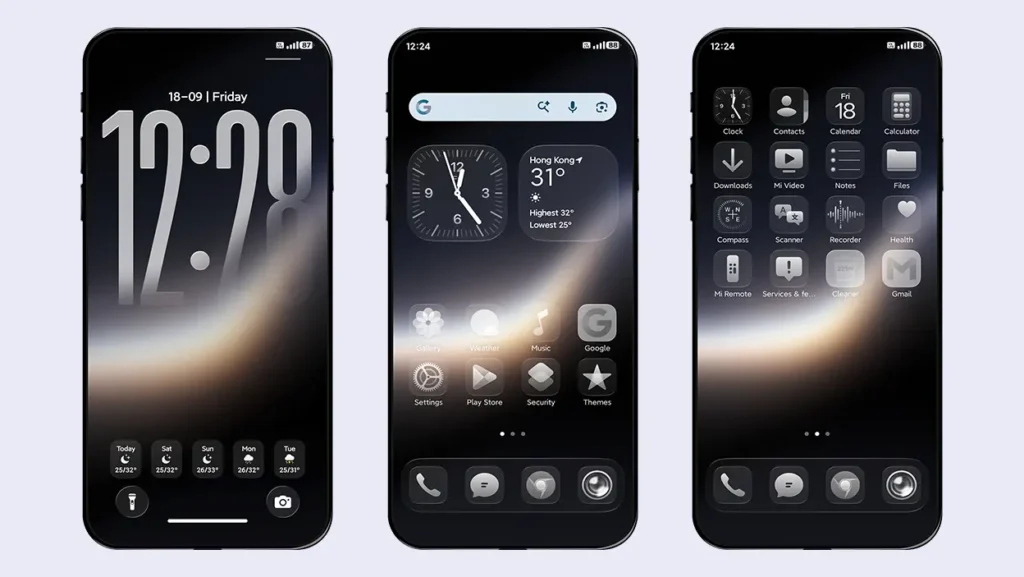
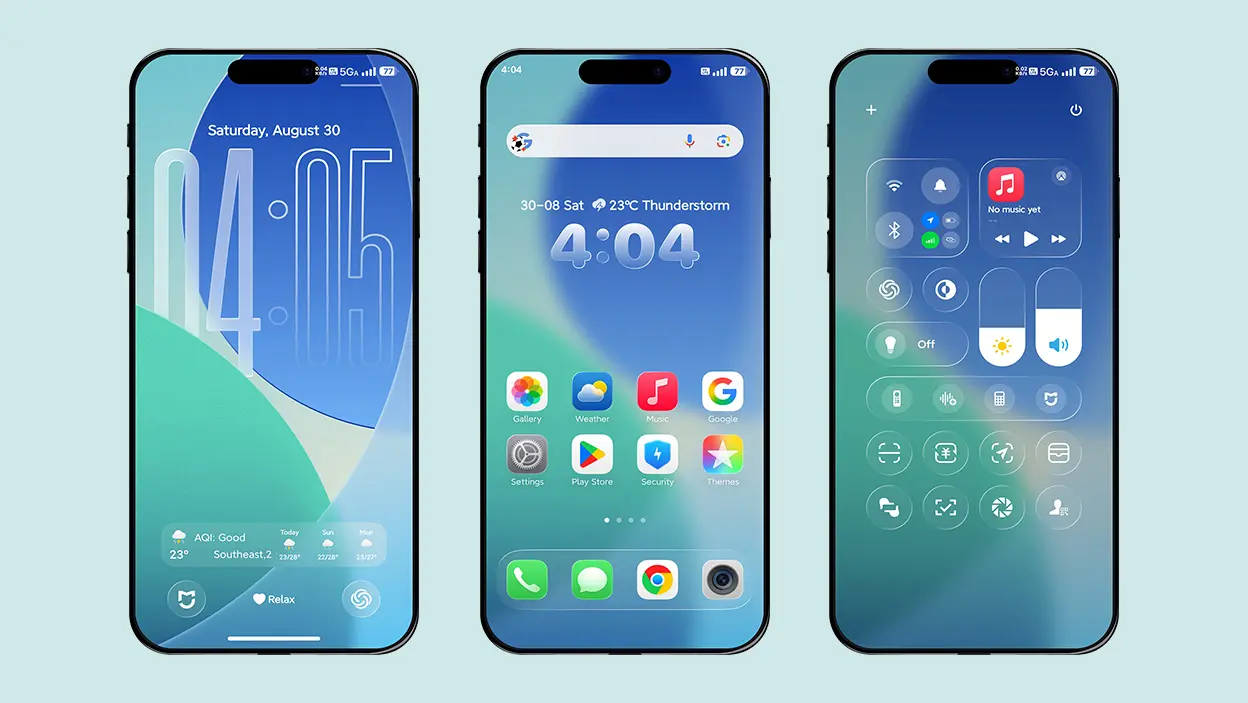
The theme brings iOS 26-inspired features, with its biggest highlight being the Clear iOS icons. These icons are not only designed in the style of iOS 26 but also feature a transparent, glass-like appearance, giving your device a unique and refreshing look.
Apart from this, the theme includes an iOS-style lock screen, glass-effect UI, widgets, depth-effect wallpapers, charging animations, and much more. Compared to many other iOS 26-inspired themes, it offers a lightweight, clutter-free, and elegant experience, making it a great choice for users who want a glass-effect iOS look without putting unnecessary strain on their device’s performance or battery.
Key Highlights Guofeng 26 Lite Edition HyperOS Theme
Let’s explore the key features of the theme that make it a great choice for an iOS-style experience.
Clear (Transparent) Icons
The key highlight of the theme is its Clear Glass-effect transparent icons, heavily inspired by the original iOS 26 Clear icons. The theme supports all system icons, but the customization is not limited to them. For other app icons, it applies a grayscale filter to give them a grayish appearance, helping maintain a consistent look across your device.
iOS 26-Style Lock Screen
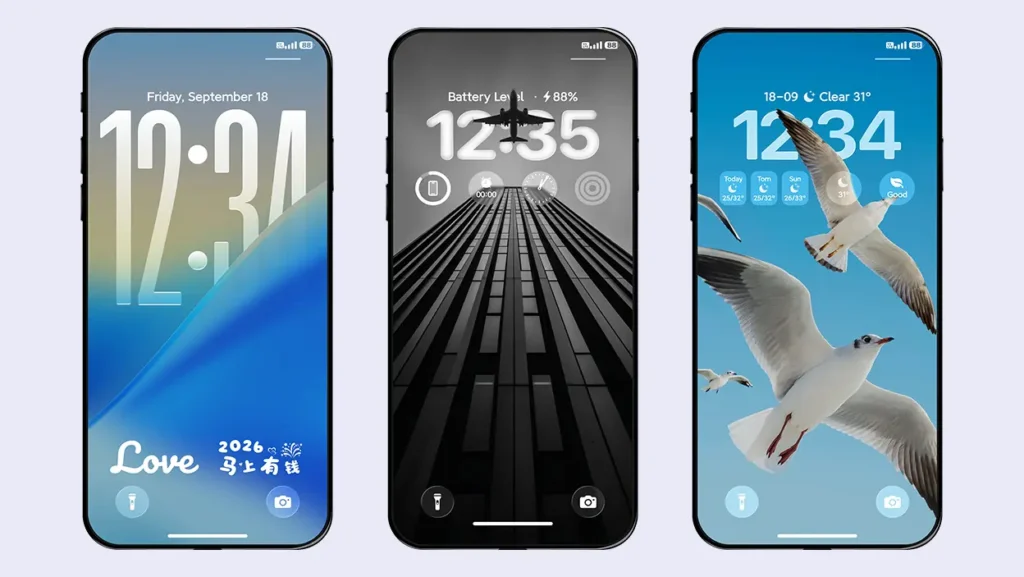
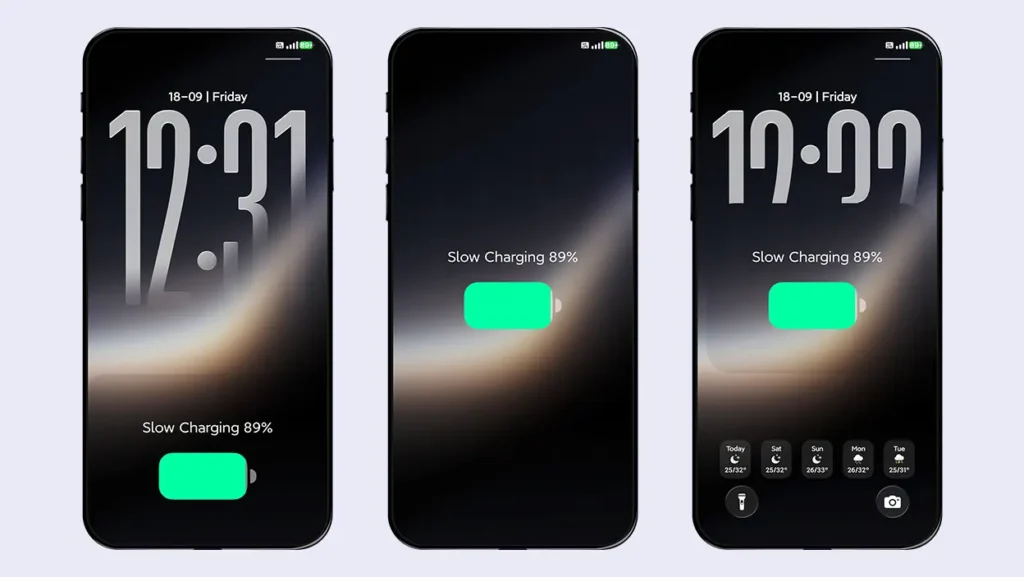
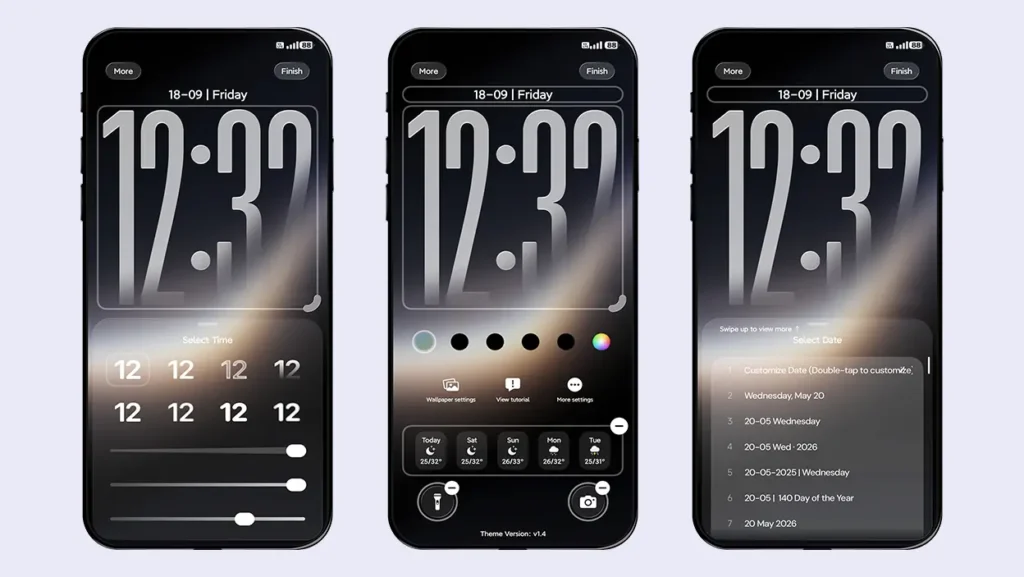
The lock screen is lightweight yet delivers an iOS-style look and feel, along with several customization options and matching glass-effect UI elements. As this is a Lite Edition theme, it focuses on providing only the necessary features, making the lock screen smoother and more responsive than many other iOS style themes.
Charging Animations
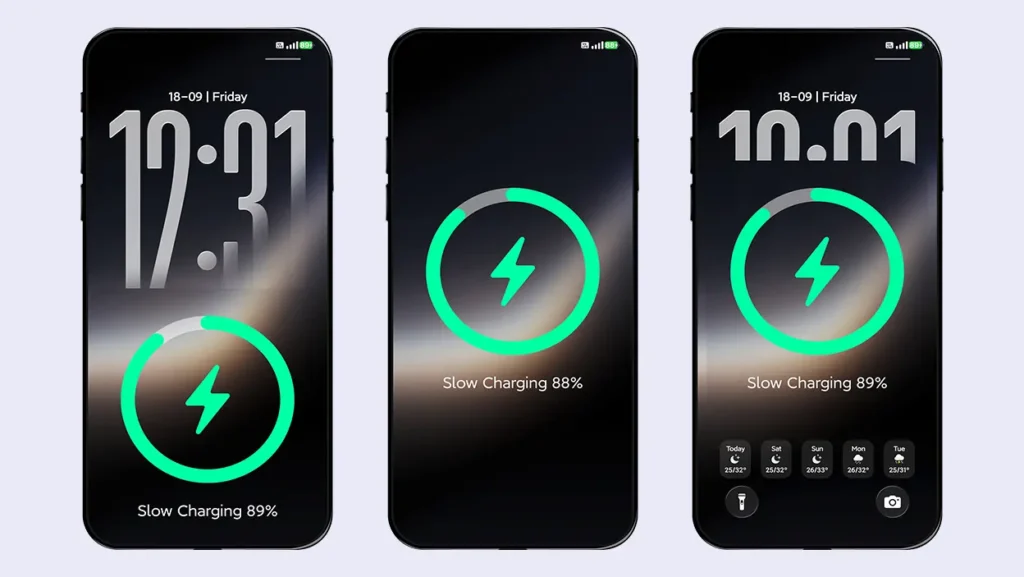
The theme offers 6 different iOS-style charging animations, which you can select from the theme’s lock screen settings. Each animation is inspired by the iOS charging experience, giving you a variety of styles to choose from.
The available styles include:
- MagSafe Ring Style (Full Screen)
- MagSafe Ring Style (Bottom half of the screen)
- MagSafe Ring Style (Floating in the center)
- Battery Style (Full Screen)
- Battery Style (Bottom half of the screen)
- Battery Style (Floating in the center)
Depth-Effect Wallpapers
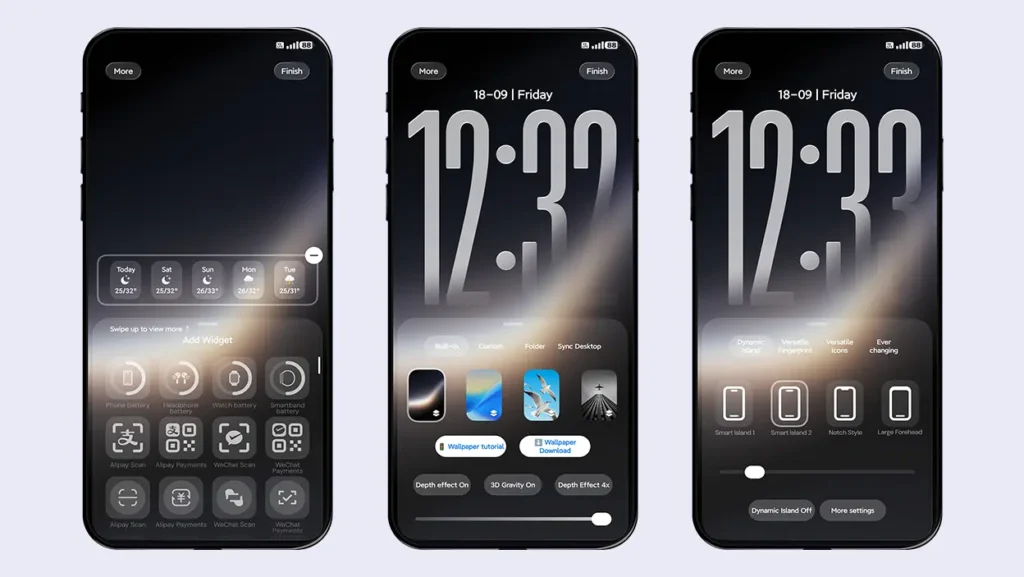
The theme includes 4 pre-installed depth-effect wallpapers, although the first wallpaper looks particularly good with the transparent icons. In addition to the included wallpapers, you can also use custom wallpapers, folder wallpapers for switching between multiple wallpapers, and synchronized desktop wallpaper options.
Multiple Date and Time Styles
The lock screen offers an adjustable time position, allowing you to fine-tune its height for a better depth-effect appearance. You can also adjust the font weight and opacity according to your preference. Apart from this, the theme includes an iOS 18-style time format with 4 different fonts for each style.
For the date section, you can choose from 31 different styles, each offering a unique format. These styles allow you to display dates in various formats, along with additional information such as calendar details, weather, activity data, the battery status of connected Bluetooth devices, your device’s battery information, and more.
Multiple Widget Support
The theme provides a wide variety of customizable widgets that can be added in 1×1, 2×1, or 4×1 sizes, as well as through different combinations. You can display useful information such as weather, battery status, AQI, activity data, custom characters, alarms, calendars, countdowns, custom signatures, and much more directly on the lock screen for quick access.
Dynamic Island
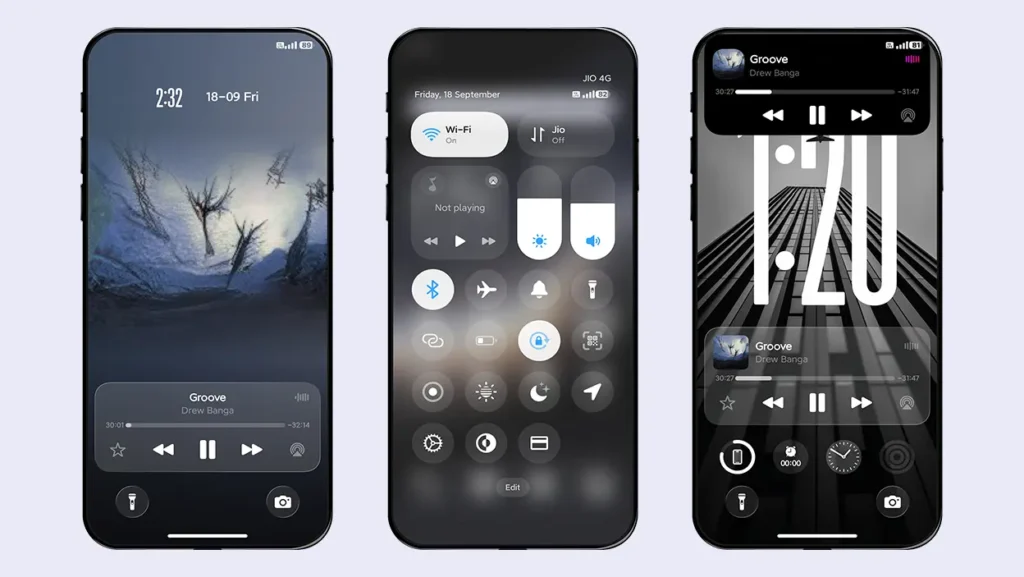
You can enjoy a more immersive iOS-style experience by enabling the Dynamic Island feature. It can display battery information when your device is charging, notifications when new alerts arrive, and currently playing music. When music is playing, you can tap the Dynamic Island to access music controls.
The theme also includes 3 additional styles: Smart Island, Notch Style, and Large Forehead. Each style can be adjusted vertically to match the front camera position of your device.
Glass-Effect Dock Bar
To make your favorite app icons look even better, the theme includes a glass-effect transparent dock bar, similar to the one found on iPhones. This adds to the overall iOS-inspired appearance and makes the home screen feel more like an iPhone. The dock bar also supports POCO devices, thanks to a small compatibility fix included in the theme.
Transparent Home Screen Widget
Following the overall glass-effect interface, the theme includes a matching transparent iOS-style home screen widget. The widget is divided into two sections: the left side displays an analog-style clock, while the right side shows current weather information.
You can adjust the widget’s position vertically, horizontally, or toward the center, giving you greater flexibility in customizing your home screen layout.
Other UI Changes
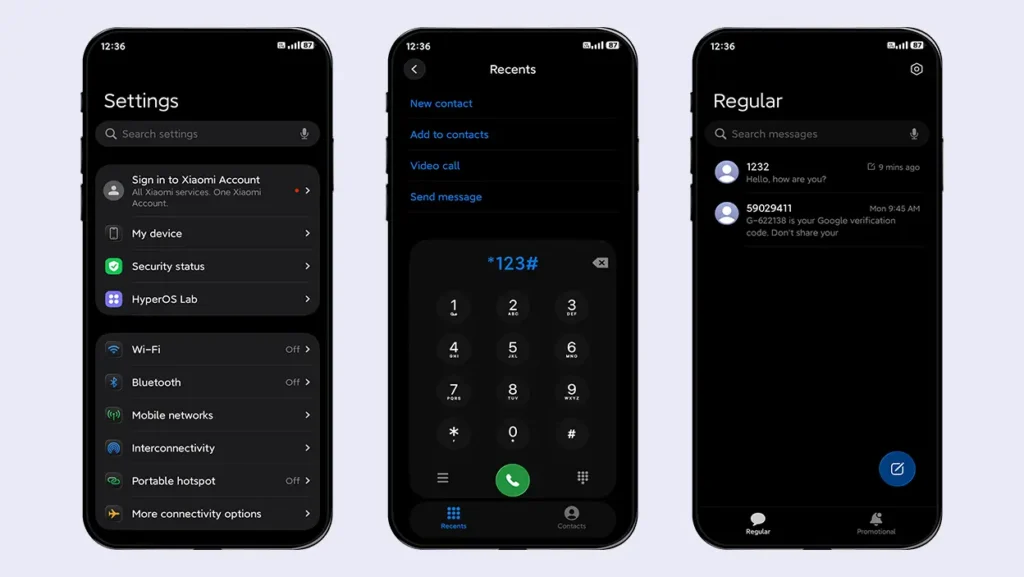
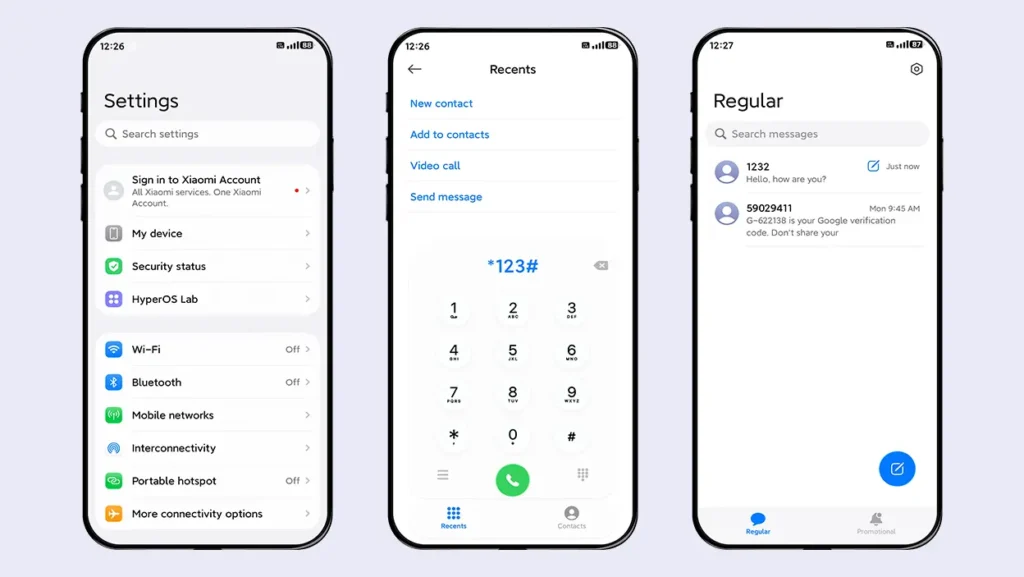
The overall aim of this theme is to deliver an iOS-style experience centered around transparent icons. With this approach, you will also notice several iOS-inspired UI changes in the Dialer, Contacts, Messaging, Settings, and Control Center.
These visual changes are also reflected in Dark Mode, allowing you to maintain a consistent glass-effect appearance even when using the dark interface.
Theme Screenshots, Download Links & Installation Guide
Here are the complete screenshots, theme details, download link, and installation guide for the Guofeng 26 Lite Edition HyperOS Theme. Follow the steps carefully to apply this MTZ theme successfully on your Xiaomi, Redmi, or Poco device.
Theme Screenshots
Take a look at the theme and its features to see how they will look on your device before you try it.
Theme Information
| Name: | Guofeng 26 Lite Edition / 果风26轻享版 |
| Designer: | 周凡 |
| Compatibility: | HyperOS 1.0 | 2.0 | 3.0 |
| Size: | 52.3 MB |
| Type: | MTZ File |
Download Links
How to Install Guofeng 26 Lite Edition Theme
Applying this MTZ theme is quick and easy. Simply follow the steps below to import the downloaded MTZ file through the Themes app and apply it successfully to your device.
- Open the Themes app on your device.
- Go to My Account.
- Tap on the Themes option.
- You’ll see a list of your pre-installed themes. Scroll down and tap on the Import option.
- Locate and select the Guofeng 26 Lite Edition [ENG].mtz file you downloaded.
- The theme will be added to your themes list.
- Finally, tap on the theme and press Apply to set it on your device.
Final Verdict
Overall, Guofeng 26 Lite Edition HyperOS Theme is a great choice for users who want to enjoy an iOS 26-inspired glass-effect experience without making their device feel overloaded. Its transparent icons, lightweight lock screen, charging animations, Dynamic Island, and customizable widgets make it a well-balanced theme for everyday use. If you are looking for a clean, elegant, and smooth iOS-style experience on your Xiaomi, Redmi, or POCO smartphone, this theme is definitely worth trying.
If you enjoyed the theme, don’t forget to share it with your friends and fellow Xiaomi users. Also, feel free to share your thoughts and experience in the comments section. If you encounter any issues while installing the theme, notice any bugs, or find any translation issues, please let us know in the comments.
That’s great! I love this theme. I hope the next themes will be Guofeng 26 and Guofeng 27. Thank you so much! ❤️