

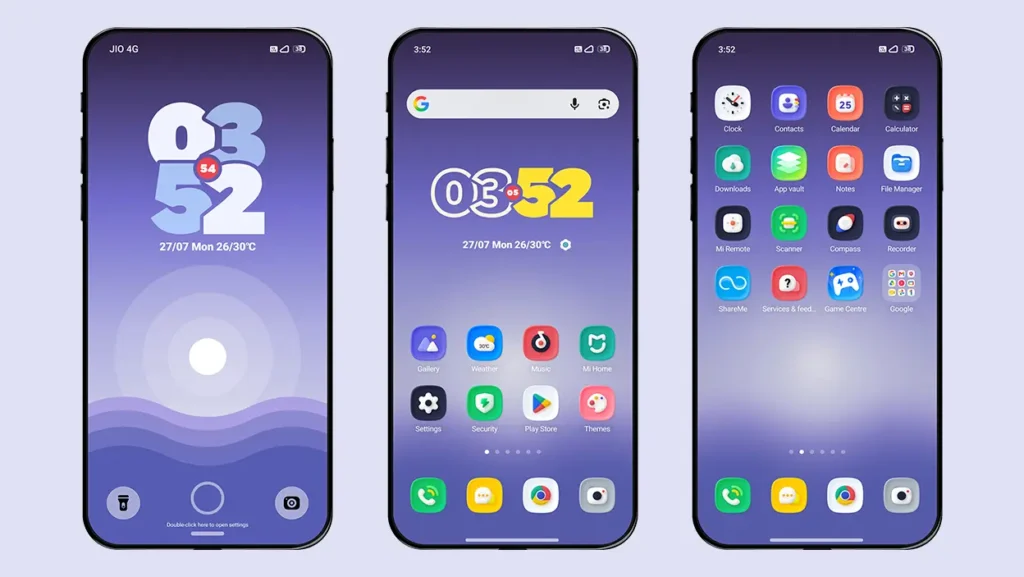
Get ready to enjoy a Stock Android experience with custom UI elements on your Xiaomi, Redmi, or POCO device. Shi Yang HyperOS Theme is a beautifully designed theme that features a Stock Android-inspired lock screen, stylish widgets, and a clean user interface. It offers the perfect blend of minimalism, elegant design, customization, and dynamic features.
This HyperOS theme lets you personalize your device the way you want with its powerful customization options. You can choose from dynamic wallpapers, multiple clock and font styles, various color combinations, and much more. Combined with 3D-styled icons and refined UI elements, it delivers a refreshing Stock Android-inspired experience that feels far more polished than the default HyperOS theme.
Shi Yang HyperOS Theme Key Features
Shi Yang HyperOS Theme offers a perfect balance of clean aesthetics and powerful customization. Here are some of its standout features.
Stock Android Style Lock Screen
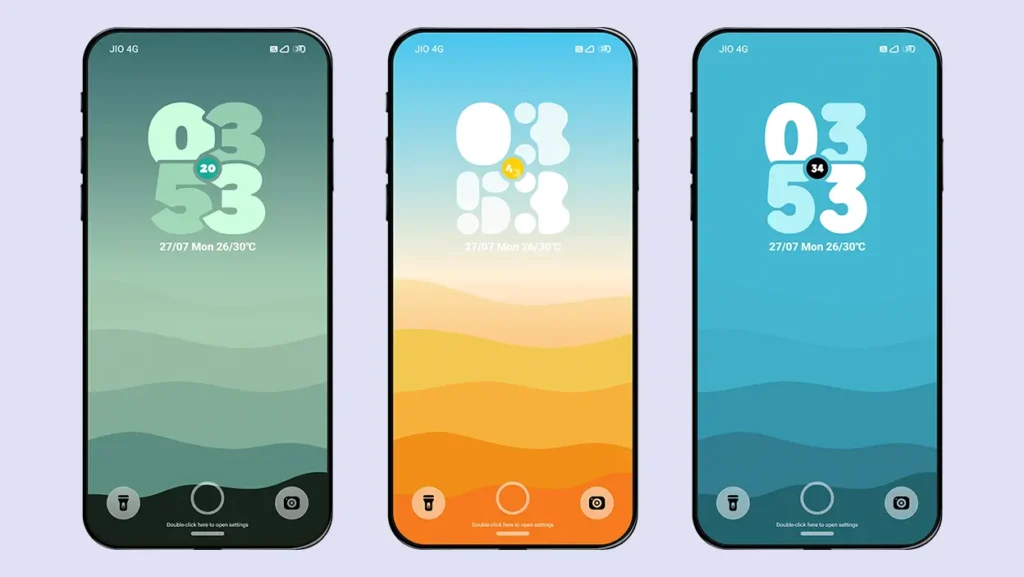
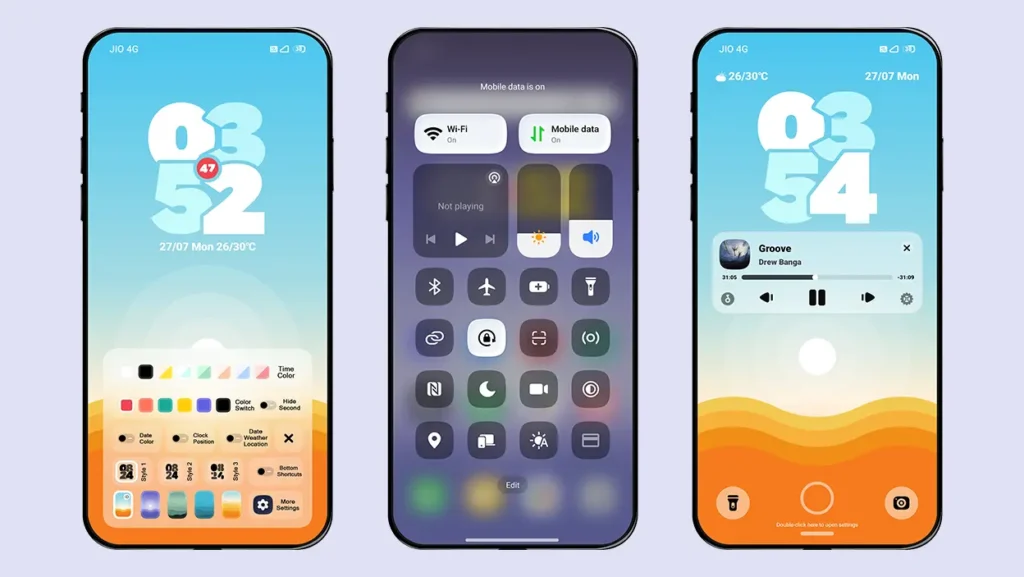
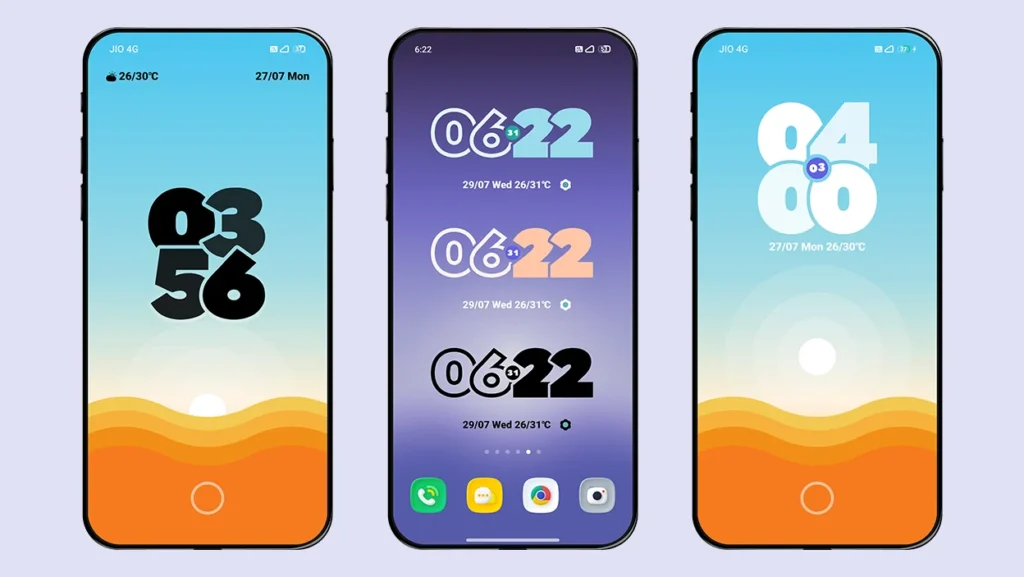
The theme features a lock screen inspired by Stock Android with several built-in customization options. Simply tap the clock to switch between different clock styles, or open the customization panel at the bottom of the lock screen to change the clock’s font style. It also includes smooth lock screen opening and unlock animations that enhance the overall user experience.
Dynamic Wallpapers
The customization menu lets you choose from five different dynamic wallpapers. Each wallpaper comes with its own unique color combination, animation, and dynamic effects. The clock colors automatically adapt to match the selected wallpaper, creating a more cohesive look.
Customizable Color Combinations
Personalize the theme with a variety of color combinations for wallpapers, clock styles, seconds digits, and date styles. You can even mix different combinations to create a unique setup that perfectly matches your favorite wallpaper.
3D Styled Icons
The theme includes over 1,000 beautifully designed 3D icons that support all system applications as well as most popular third-party apps. The icons feature a clean and elegant design that perfectly complements the overall visual style of the theme.
Home Screen Widget Customization
The home screen clock widget offers customization options similar to those on the lock screen. You can modify the clock style, font style, clock color, and date color to match your overall setup. The widget also features a smooth animation every time you return to the home screen.
3D Styled UI Elements
This Xiaomi theme maintains a consistent 3D design language across the entire interface, including the Control Center, Dialer, Messages, Settings, and other system applications, delivering a modern and visually appealing user experience. The status bar is fully revamped with new icons and battery indicator.
Theme Screenshots, Download Links & Installation Guide
Here are the complete screenshots, theme details, download link, and installation guide for the Shi Yang HyperOS Theme. Follow the steps carefully to apply this MTZ theme successfully on your Xiaomi, Redmi, or Poco device.
Theme Screenshots
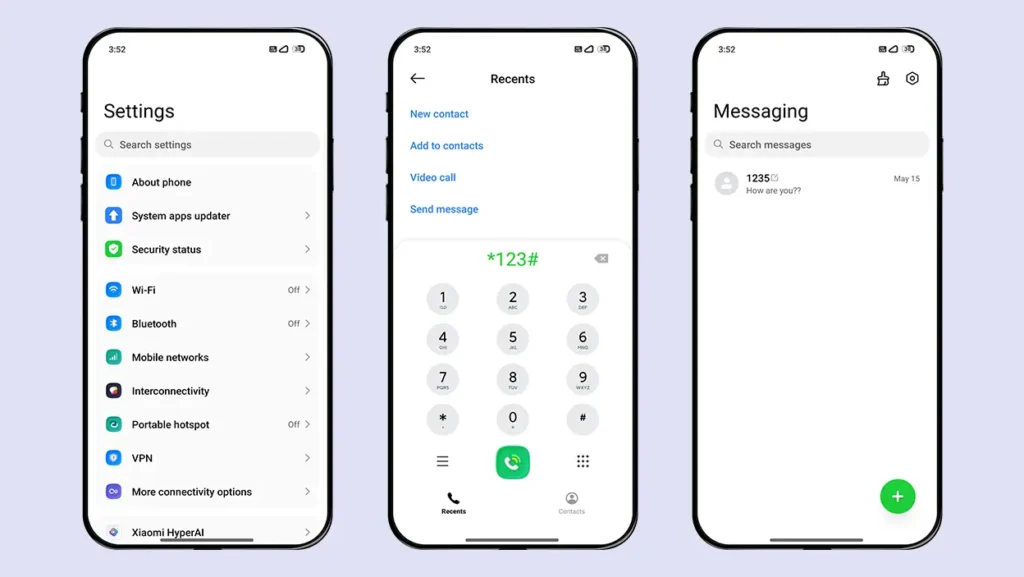
Theme Information
| Name: | Shi Yang / 时央 |
| Designer: | 王小帅 |
| Compatibility: | HyperOS 1.0 | 2.0 | 3.0 |
| Size: | 57.6 MB |
| Type: | MTZ File |
Download Links
Using a Global ROM? Learn how to permanently apply MTZ themes on your Xiaomi, Redmi, or POCO device.
How to Apply MTZ Theme
Applying this MTZ theme is quick and easy. Simply follow the steps below to import the downloaded MTZ file through the Themes app and apply it successfully to your device.
- Open the Themes app on your device.
- Go to My Account.
- Select the Themes option.
- You’ll see a list of your pre-installed themes. Scroll down and tap on the Import option.
- Locate and select the Shi Yang [ENG].mtz file you downloaded.
- The theme will be added to your themes list.
- Finally, tap on the theme and press Apply to set it on your device.
Our Final Thoughts
If you’re looking for a clean and minimal theme that combines powerful customization features with a Stock Android-inspired design, then download Shi Yang HyperOS Theme for your Xiaomi, Redmi, or POCO smartphone. It transforms the overall look of your device into a modern and aesthetically pleasing experience without compromising performance.
If you enjoyed the theme, don’t forget to share it with your friends and fellow Xiaomi users. Also, share your opinion in the comments section. If you face any issues while installing the theme or encounter any bugs, please let us know.
I try to download and it asks me what email then doesn’t really work
Google drive has download limits. You can try again after some time.