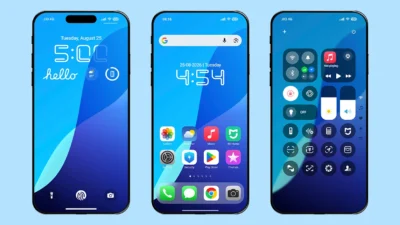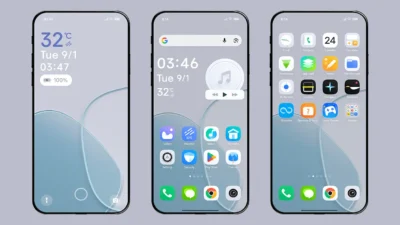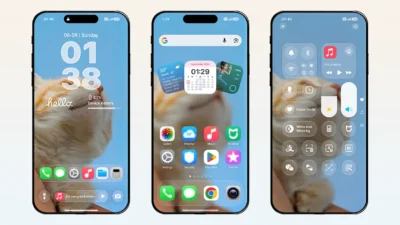

HyperOS themes have completely transformed the way Xiaomi, Redmi, and POCO users personalize their smartphones. With beautiful icons, smooth animations, feature-rich lock screens, informative home screen widgets, and countless customization options, they offer one of the easiest ways to give your device a unique and immersive new look.
A well-designed theme can elevate your entire smartphone experience by introducing a refreshed user interface, modern aesthetics, and useful additional features. With just a single HyperOS theme, you can even enjoy the look and feel of iOS, Stock Android, or One UI without replacing your device or installing a custom ROM.
If you don’t have the time to browse through hundreds of themes to find the perfect one, we’ve done the hard work for you. This carefully curated collection features the best HyperOS themes available in 2026. Whether you prefer a clean minimalist design, an iOS-inspired glass-effect interface, a premium lock screen, or a feature-rich experience, you’ll find themes that combine stunning visuals, excellent functionality, and a seamless user experience.
How We Selected the Best HyperOS Themes
The themes featured in this collection have been carefully handpicked based on their popularity across various platforms, user feedback, and our own in-depth reviews. Instead of randomly selecting themes, we’ve evaluated each one to help you discover the very best options without spending hours searching.
Our selection is based on several key factors, including design quality, lock screen features, icon design, user interface, compatibility with HyperOS, overall stability, and ease of use. Every theme on this list delivers an excellent balance of visual appeal, functionality, and performance, ensuring you get the best possible experience on your Xiaomi, Redmi, or POCO device.
Best HyperOS Themes for Xiaomi, Redmi & POCO Devices
Explore our handpicked collection of the best HyperOS themes, carefully selected for their outstanding design, innovative features, and overall user experience
1. Raster Seasonal Lock Screen Card
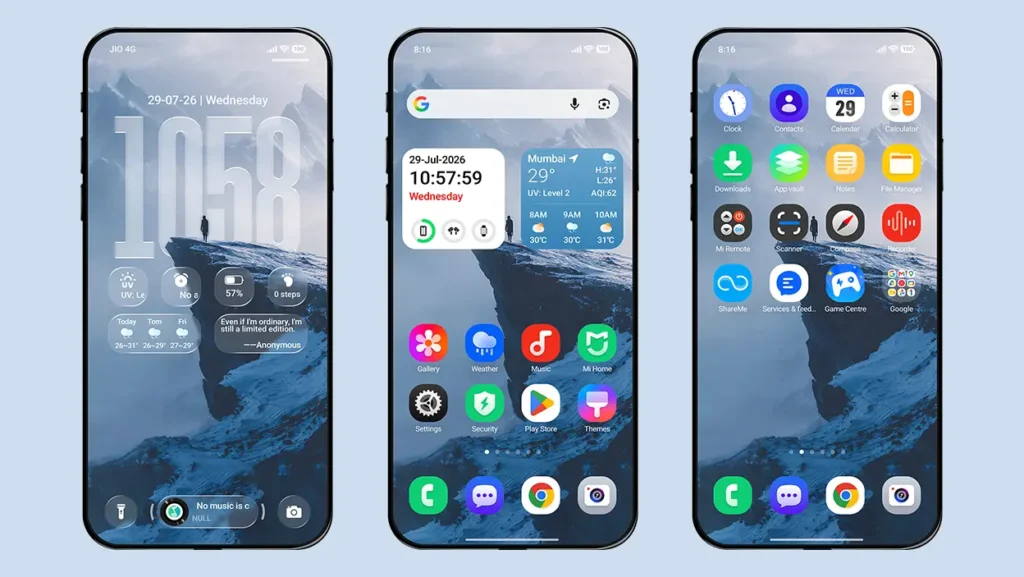
Raster Seasonal Lock Screen Card is one of the most advanced HyperOS themes available for Xiaomi, Redmi, and POCO devices. It features a highly customizable lock screen with premium One UI-inspired icons, immersive depth effect wallpapers, a unique raster effect, interactive widgets, and convenient shortcuts. The rest of the interface draws inspiration from the latest iOS-style glass-effect design, creating a modern and premium user experience.
Key Features
- Advanced Lock Screen and Cards
- Multiple Widgets
- Charging Animation
- Raster Effect
- Depth Effect Wallpapers
- One UI Style Icons
2. iP26 Super 3D Depth of Field
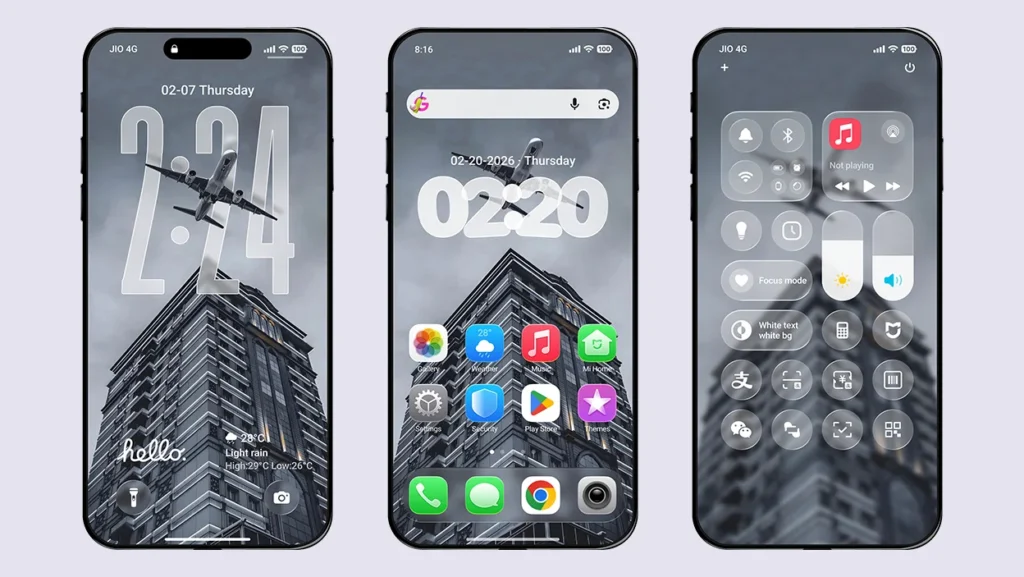
iP26 Super 3D Depth of Field is one of the most popular iOS 26 HyperOS themes for Xiaomi, Redmi, and POCO devices. It features premium iOS 26-style icons, a highly detailed lock screen, and an interface that closely resembles the latest iPhone experience. If you’re looking to transform your device with an authentic iOS-inspired design, this theme is definitely worth trying. In addition to its stunning visuals, it also offers advanced customization options, allowing you to personalize the interface to suit your preferences.
Key Features
- iOS 26 Icons
- iOS 26 Lock Screen
- Depth Effect Wallpapers
- iOS 26 Style Control Center
- Multiple Widgets and Date Style Support
- Always-On Display (AOD) & StandBy Mode
- Smart Island Support
- Glass Effect Control Center
3. Super-Immersive Max Depth of Field
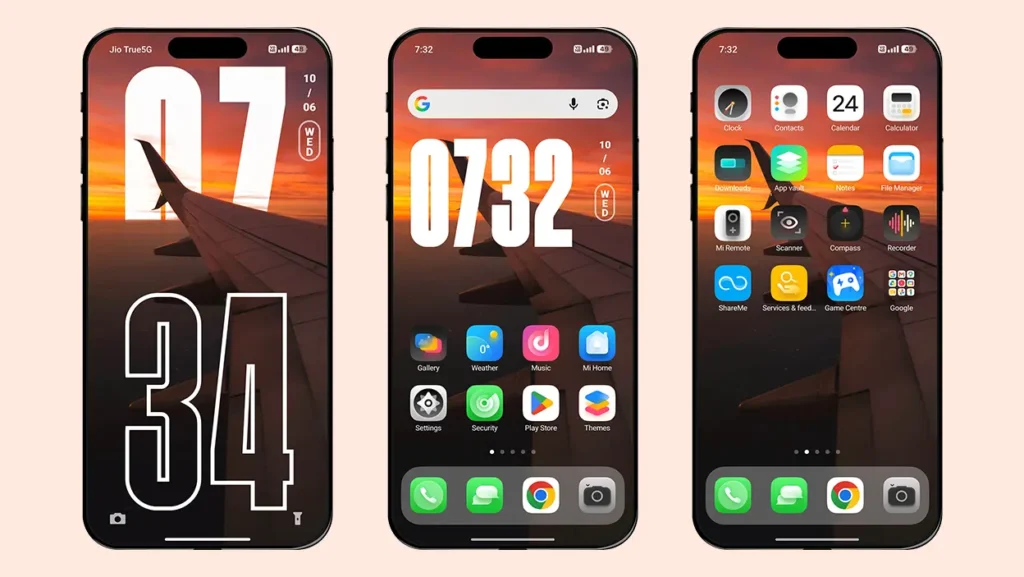
Super-Immersive Max Depth of Field HyperOS theme comes with built-in depth effect wallpapers, stylish clock customization, high-quality icons, an immersive charging animation, Smart Island support, and several premium UI enhancements. The theme also offers extensive customization options and full dark mode support, making it one of the most complete Xiaomi themes available.
Key Features
- Built-in Depth Effect Wallpapers
- iOS Inspired Charging Animation
- Always-On Display (AOD) & StandBy Mode
- Global Splash Screen Effects
- High Quality Icons with Dock Bar Support
- Time Style Customisation
- Smart Island Support
4. Free Canvas
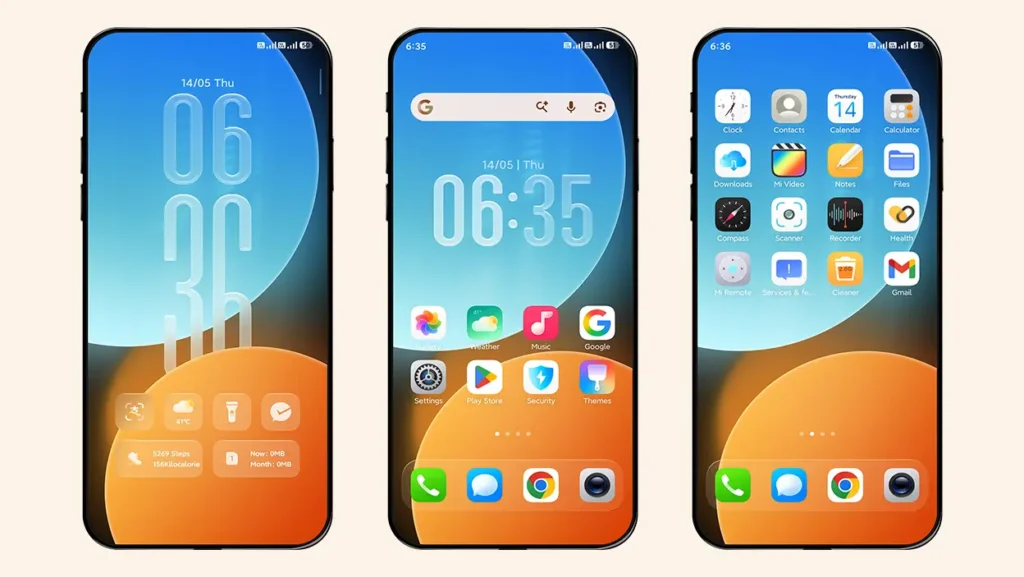
Free Canvas is a unique HyperOS theme known for its freely customizable lock screen and premium glass-effect user interface. Inspired by the latest ColorOS design, it lets you move and arrange the clock and widgets anywhere on the lock screen, giving you complete control over its layout. Combined with elegant icons and immersive visual effects, Free Canvas delivers a modern and highly personalized experience for Xiaomi, Redmi, and POCO devices.
Key Features
- ColorOS-Style Lock Screen with Free Customization
- Glass-Effect Clock & Widgets
- Unique Charging Animation
- Depth Effect Wallpaper Support with Animations
- Premium-Quality Icons
- Glass-Effect Dock Bar
5. Fruit Wind 26 Dual-Color Icon Edition
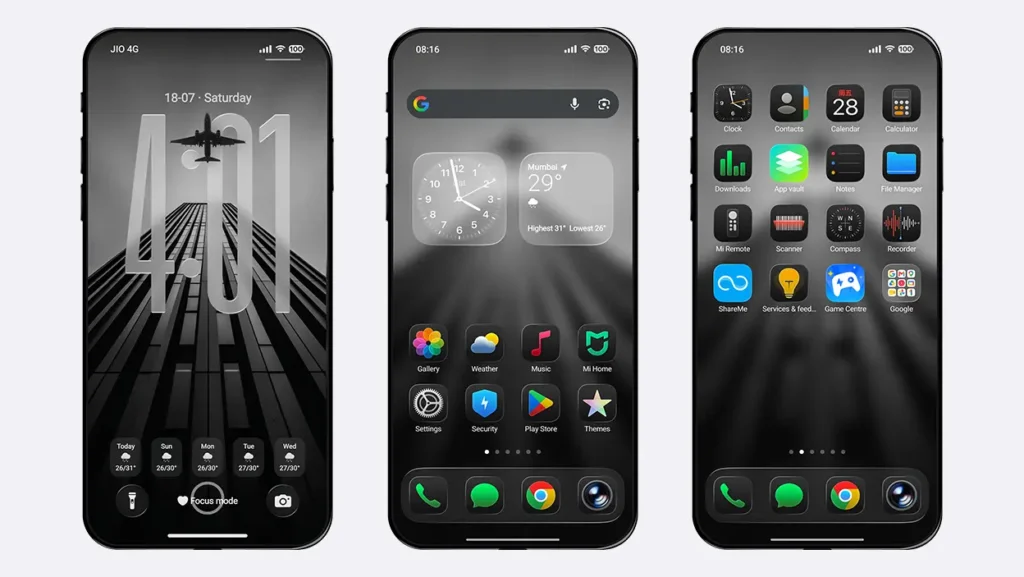
Fruit Wind 26 Dual-Color Icon Edition is one of the most popular iOS-inspired HyperOS themes for Xiaomi, Redmi, and POCO devices. It delivers a premium dark mode experience with dual-tone iOS 26-style icons, elegant wallpapers, and a clean user interface inspired by the latest iPhone design. Designed for users who prefer a sleek and minimal dark aesthetic, the theme combines beautiful visuals with excellent performance for a smooth everyday experience.
Key Features
- Dual-Tone iOS 26-Style Icons
- Clean Lock Screen Interface
- Glass-Effect Dock Bar
- iOS-Style Charging Animation
- System-Wide Dark Mode Support
- Home Screen Widget
6. O
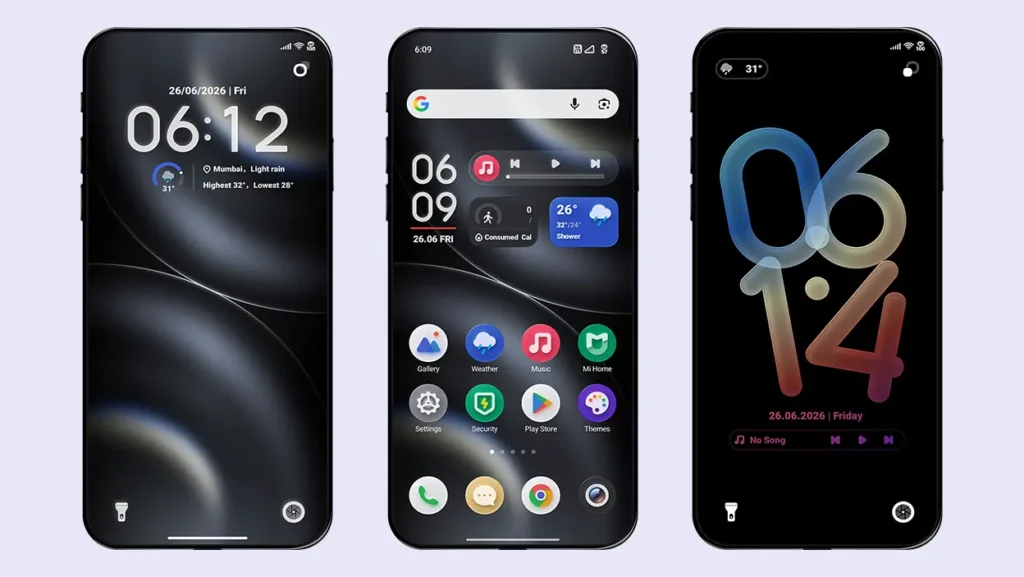
O is a visually striking HyperOS theme that brings stunning 3D UI effects and a clean, immersive interface to Xiaomi, Redmi, and POCO devices. From 3D-style icons and elegant home screen widgets to a beautifully designed lock screen and smooth system animations, every element is crafted to deliver a premium user experience. If you’re looking for a fresh and unique design that stands out from the default HyperOS interface, O is an excellent choice.
Key Features
- 3D UI Elements
- Feature-Rich Home Screen Widget
- Advanced Lock Screen
- Premium UI with Smooth Performance
- Multiple Clock & Date Styles
7. Star Fruit 27
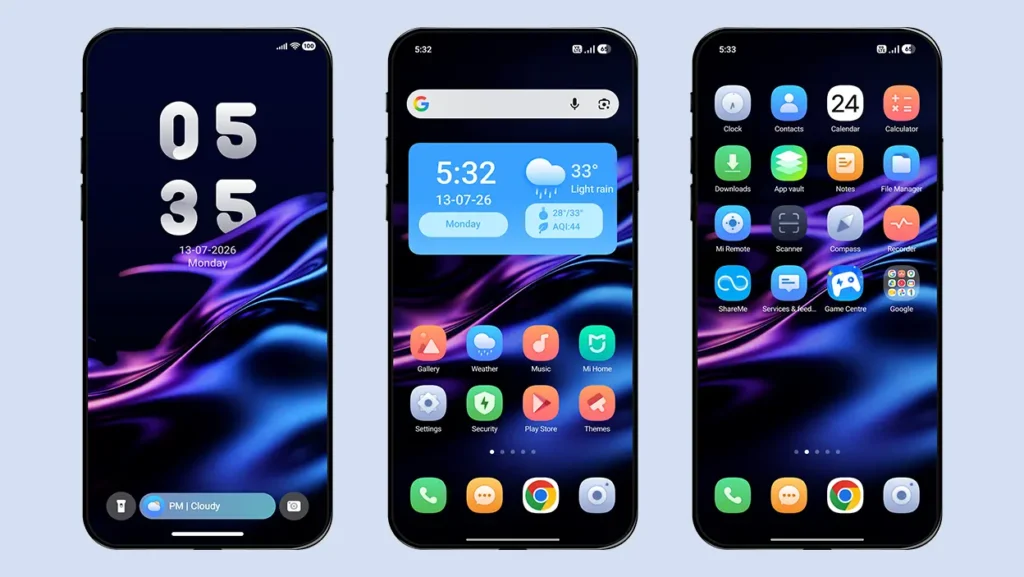
Star Fruit 27 is a beautifully designed HyperOS theme that focuses on clean aesthetics and a clutter-free user experience. Featuring elegant gradient wallpapers, premium icons, a useful home screen widget, and a minimal lock screen, it gives your Xiaomi, Redmi, and POCO device a modern and refined look. With its lightweight design and smooth performance, Star Fruit 27 is an excellent choice for everyday use.
Key Features
- Minimal Aesthetics
- Clutter-Free Lock Screen
- Bottom Capsule
- Home Screen Widget
- Gradient Wallpapers
- Beautiful Icons
8. Shi Yang
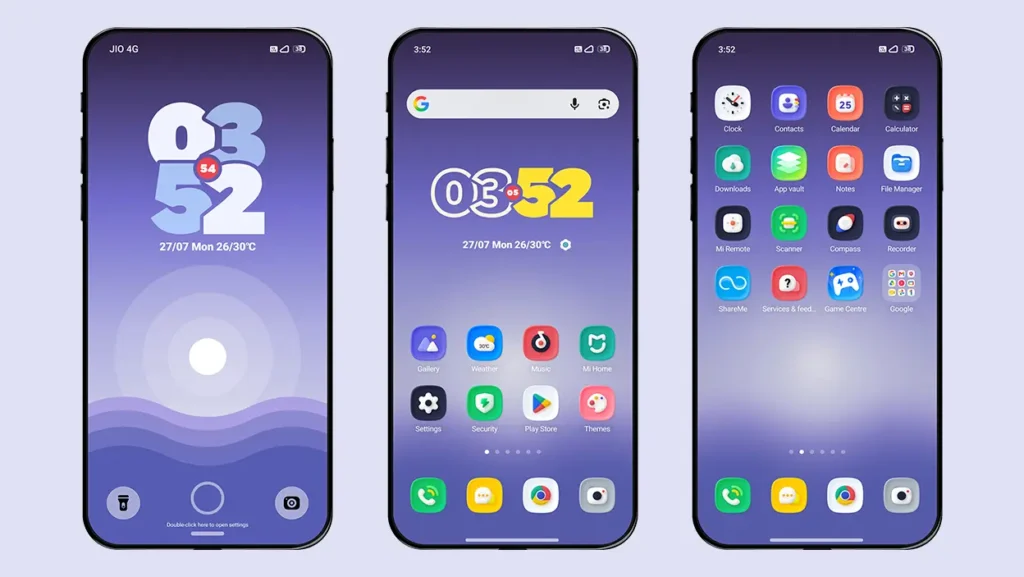
Shi Yang is a beautifully crafted HyperOS theme inspired by the clean and minimal look of Stock Android. It features a modern lock screen, stylish widgets, 3D-styled icons, and a refined user interface that delivers a smooth and elegant experience. Combining minimalism with customization options and dynamic visual effects, Shi Yang is an excellent choice for users who prefer the simplicity of Stock Android with the added flexibility of HyperOS themes.
Key Features
- Stock Android-Style Lock Screen
- Dynamic Wallpapers
- Customizable Color Combinations
- 3D-Styled Icons
- Home Screen Widget Customization
- Minimal and Clean User Interface
9. Codename G26
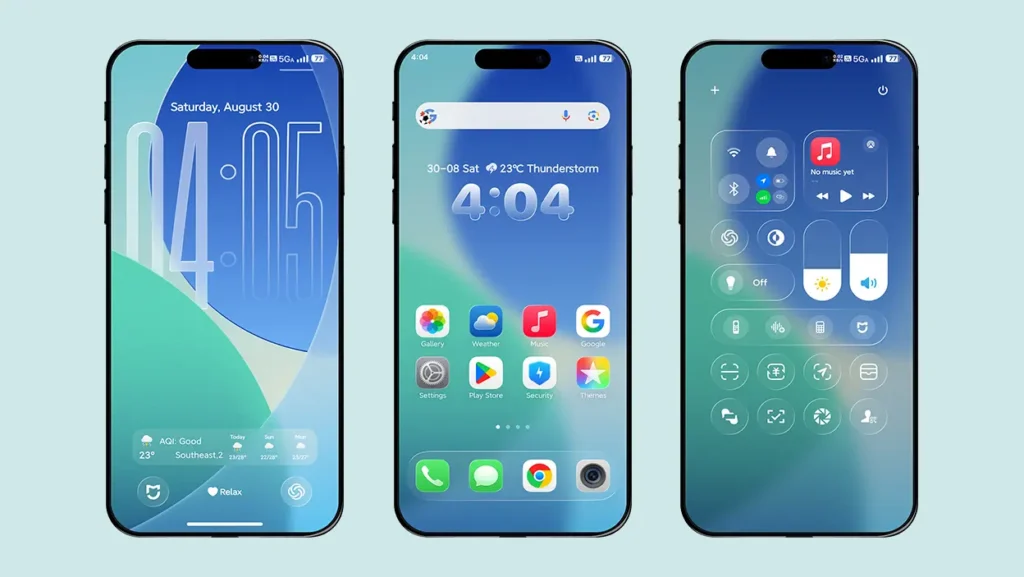
Codename G26 is a premium HyperOS theme inspired by the latest iOS 26 design. It gives your Xiaomi, Redmi, or POCO device a complete visual makeover with iOS-style icons, an immersive lock screen, a glass-effect Control Center, depth effect wallpapers, StandBy Mode, charging animations, and much more. If you’re looking for one of the most complete iPhone-like experiences on HyperOS, Codename G26 is an excellent choice.
Key Features
- iOS 26-Style Dual-Tone Icons
- Glass-Effect Control Center
- iOS 26 Lock Screen with Control Center
- StandBy Mode Support
- iOS-Style Charging Animation
- Depth Effect Wallpapers & Customizable Widgets
10. Starry Star UI
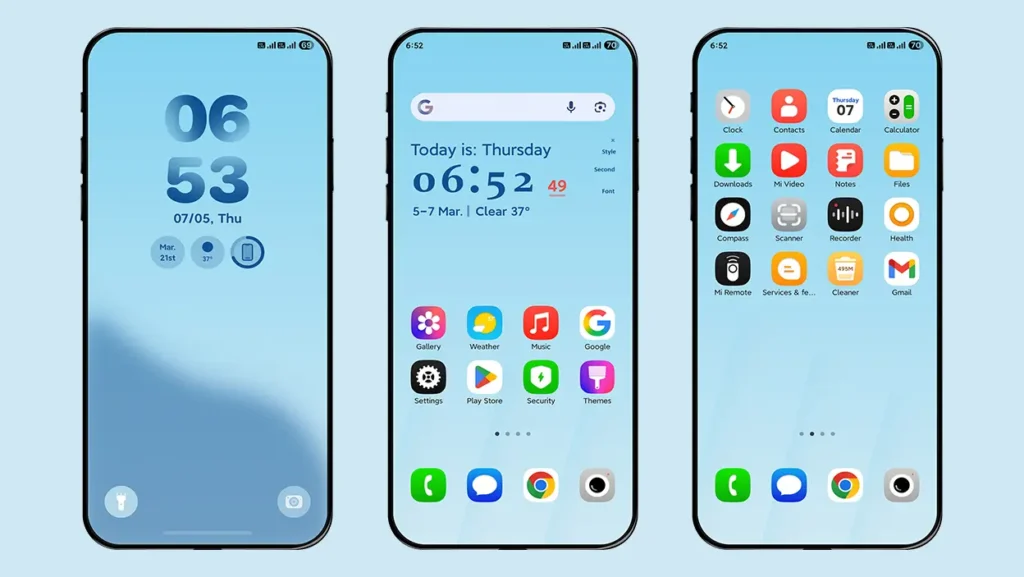
Starry Star UI is a beautifully crafted HyperOS theme inspired by Samsung’s latest One UI 8 and One UI 8.5 design. Once you install this theme, your Xiaomi, Redmi, or POCO device transforms into a One UI-inspired experience that looks and feels remarkably close to a Samsung smartphone. From authentic One UI icons and a fully customizable lock screen to stylish widgets and a full-screen music player, every element has been carefully designed to deliver a clean, modern, and premium interface.
Key Features
- One UI-Style Icons
- Fully Customizable One UI-Style Lock Screen
- Customizable Widgets, Clock Styles & Fonts
- Home Screen Widget with Multiple Styles
- Full-Screen Music Player Support
- Minimal & Clean User Interface
How to Install HyperOS Themes
For Global ROM Users
If you’re using the official Global ROM on your Xiaomi, Redmi, or POCO device, follow our detailed guide below to learn how to install MTZ themes permanently without root access.
For Custom ROM Users
If you’re using a Custom ROM such as Xiaomi EU, installing HyperOS themes is quick and straightforward. Simply import the downloaded MTZ file through the Themes app by following these steps:
- Open the Themes app on your device.
- Go to My Account.
- Tap Themes option.
- Scroll down and select Import.
- Locate and select the downloaded MTZ file.
- The theme will be added to your themes list.
- Open the imported theme and tap Apply to enjoy the theme.
Frequently Asked Questions
1. Are these HyperOS themes free to download?
Yes. All the HyperOS themes featured in this collection are completely free to download and use. You can also explore hundreds of other free HyperOS and MIUI themes available on MTZOnly.
2. Do these themes work on Xiaomi, Redmi, and POCO devices?
Yes. All the themes listed on this page are compatible with Xiaomi, Redmi, and POCO devices running HyperOS.
3. Are these themes compatible with HyperOS 2 and HyperOS 3?
Yes. All the themes featured in this collection are compatible with HyperOS, HyperOS 2, and HyperOS 3.
4. Can I use these themes on the official Global ROM?
Yes. These themes can also be installed on the official Global ROM. Simply follow the installation guide linked in the How to Install HyperOS Themes section above.
5. Do I need root access to install MTZ themes?
No. Root access is not required. We’ve provided installation methods for both official Global ROM users and Custom ROM users in the installation guide above.
6. Will installing a HyperOS theme affect my device’s performance?
Most themes run smoothly on supported devices. However, themes with complex animations, advanced lock screens, or heavy visual effects may perform less smoothly on entry-level or older devices.
7. Can I switch back to the default theme anytime?
Yes. You can switch back to the default Classic theme at any time through the Themes app.
If you still have any questions or suggestions, feel free to leave a comment below or contact us anytime. We’ll be happy to help.
8. How often is this list updated?
We regularly review and update this collection whenever we discover new HyperOS themes that meet our quality standards. Our goal is to keep this list current with the best themes available for Xiaomi, Redmi, and POCO devices.
Final Thoughts
No matter your preference, every theme featured in this collection has been carefully selected for its outstanding design, features, and overall user experience. Whether you’re looking for an iOS 26-inspired interface, a feature-packed lock screen, a clean minimalist design, dark mode support, or a Samsung One UI-inspired experience, you’ll find a HyperOS theme that suits your style.
We’ll continue updating this collection as new and better HyperOS themes become available. Be sure to bookmark this page and check back regularly to discover the latest and free HyperOS themes for your Xiaomi, Redmi, or POCO device.